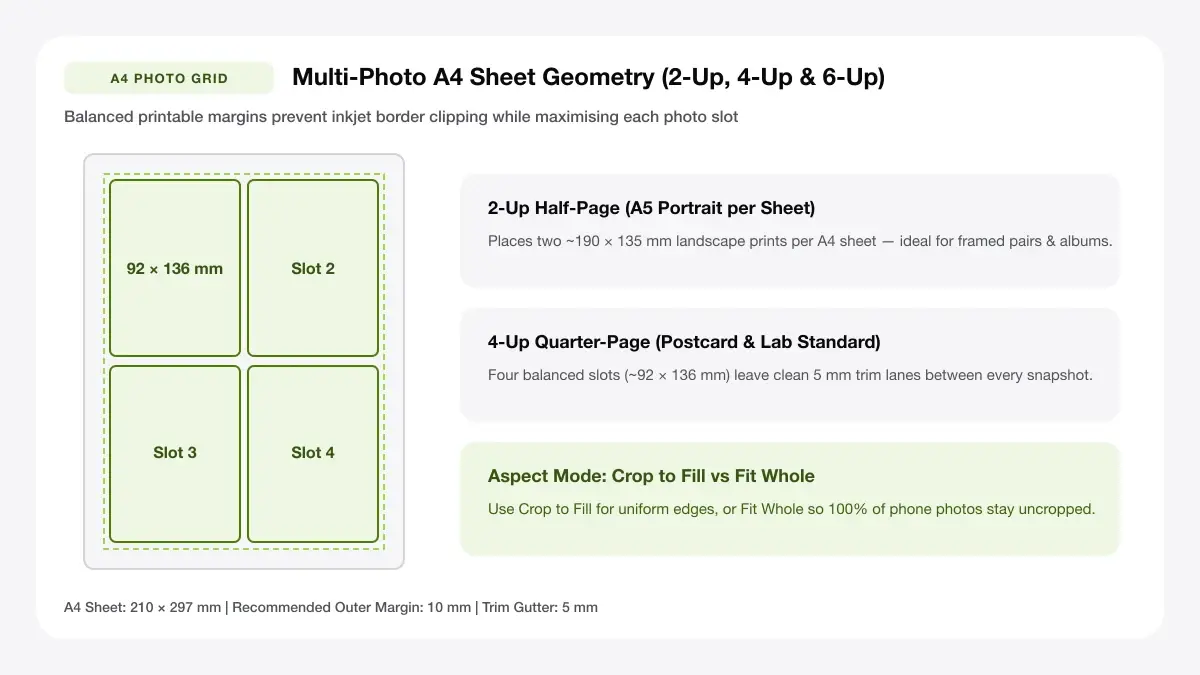
Multi-Photo Sheet Setup Reference Diagram
Choose the best paper stock, grid count, and print scaling factor for crystal-clear multi-photo home prints.
How to print multiple photos on one page: the three main methods
Before picking settings, decide whether you need exact millimetre sizes or quick casual thumbnails. Every way to learn how to print multiple photos on one page falls into one of three reliable workflows below.
| Method | Best For | Exact Sizes? | Works Offline / Zero Install |
|---|---|---|---|
| Browser photo sheet maker | Exact 4×6, wallet, passport & mixed tiles | Yes (millimetre PDF) | Yes (any modern browser) |
| OS print dialog (Windows / macOS) | Fast contact sheets & 2/4-up prints | Limited presets only | Built into OS |
| Phone or printer-brand app | Direct wireless camera-roll prints | Basic grid choices | Requires vendor app |
Use an online photo sheet maker
When you need predictable margins, custom cell counts (for example three rows of two, or mixed portrait and landscape frames), or a reusable file you can take to a local copy shop, a dedicated browser layout builder is the fastest option.
You upload images from disk or phone gallery, lock A4 or US Letter orientation, pick Cover (trim to fill) or Contain (keep entire frame intact), toggle faint trim lines, and export a 100%-scale vector PDF.
Best when you want exact sizes and a PDF
Built-in operating system print dialogs quietly rescale cells based on hidden printer driver margins. Generating a locked PDF first guarantees two printers on two continents produce identical physical print dimensions.
Use the built-in print dialog on your computer
Windows 11 File Explorer and macOS Preview both offer quick multi-picture grid options without opening any editor. They work well when casual spacing is fine and all source photos share roughly the same orientation.
Photos app and picture print layouts
In Windows Print Pictures you pick Contact Sheet (35), Wallet (9), 4×6 (2 per Letter/A4), or 5×7 (2 per sheet). Beware the checked 'Fit picture to frame' box, which aggressively crops portraits unless unchecked.
Use a phone or printer app
iOS Share Sheet Print allows basic single-photo printing via AirPrint, while brand apps such as Canon PRINT, HP Smart, and Epson iPrint add simple 2-up and 4-up collage grids on Wi-Fi.
Printer-brand apps and AirPrint
Mobile printer apps compress large raw photos aggressively before wireless transfer—good enough for quick 4×6 snapshots, less reliable when printing crisp 300 DPI keepsakes or text collages.
How do I print multiple pictures on one page without losing quality?
The most common question beginners ask—how do i print multiple pictures on one page without soft faces or pixelated textures—comes down to three technical checks: source pixels per inch, disabled print-driver shrink, and matching paper coating.
Match picture size to print size
Every digital image has a fixed width and height in pixels. Printing a 600 × 800 px messaging-app thumbnail at half-A4 size stretches sparse pixels across inches of coated paper.
Pixels needed for 300 DPI
Multiply target print inches by 300 to find ideal pixels. A 4×6 in (102 × 152 mm) print shines at 1,200 × 1,800 px; a 5×7 in slot needs 1,500 × 2,100 px; wallet 2.5×3.5 in tiles stay razor-sharp even from 750 × 1,050 px smartphone crops.
Turn off scaling and borderless crop
In your PDF viewer print box, always select 'Actual Size' or '100% Scale'. Avoid 'Fit to Printable Area' whenever layout grids rely on exact inch or millimetre sizing, and keep 'Borderless' off unless artwork intentionally bleeds past sheet edges—borderless drivers expand pages by 2–4% and clip outer photo frames.
Choose the right paper and print quality
Switch the media type dropdown from 'Plain Paper' to 'Photo Matte', 'Premium Glossy', or 'Semi-Gloss/Satin' before hitting Print. Setting Media Type instructs an inkjet head to meter finer ink droplets cleanly into microporous resin coatings rather than flooding pulp fibres.
— FASTER BROWSER ALTERNATIVE —
Skip Manual Setup — Use Our Free Arrange Photos for Printing
Instead of wrestling with printer driver scaling or manual table margins, generate a locked 100%-scale PDF directly in your browser using our arrange photos for printing tool.
Layouts for printing several pictures on one page
Choosing the right cell grid avoids awkward wide white strips and minimises trimming time with scissors or a rotary cutter. Use our interactive photo builders like our 2-up layout maker when deciding
| Grid / Pictures per Sheet | Approx. Cell Size on A4 | Best Practical Use |
|---|---|---|
| 2-up Landscape | 138 × 198 mm (or two 4×6 in) | Full 4R/4×6 prints, half-page recipes, travel cards |
| 4-up (2 × 2) | 95 × 138 mm (approx. 3.7 × 5.4 in) | Greeting inserts, scrapbook tiles, comparison sheets |
| 6-up (2 × 3) | 90 × 90 mm or 88 × 92 mm | Square Instagram tiles, product catalogue thumbnails |
| 9-up (3 × 3) | 60 × 90 mm (approx. 2.4 × 3.5 in) | Wallet photos, student IDs, craft swap cards |
| 16-up to 24-up | 45 × 65 mm / 35 × 45 mm | Contact proofs, passport/visa grids, inventory tags |
2, 4 and 6 picture layouts
Even symmetric grids print and cut cleanly in straight continuous trimmer passes across an A4 or Letter sheet.
Two pictures on one page
Rotating A4 to landscape lets two vertical 4×6 in (102 × 152 mm) snapshots sit side by side cleanly, or hold two full-width A5 prints per sheet with a single centre slice.
Four pictures on one page
A 2×2 grid matches standard portrait A4 proportions (1:1.414) almost identically inside each quadrant, so rectangular DSLR and phone camera shots need minimal cropping.
Mixed-size and different-photo layouts
Collage and memory-board sheets combine one hero 5×7 frame alongside two or three smaller portrait tiles. To prevent stretching, use 'Contain' fit mode if ratios vary wildly between vertical phones and horizontal cameras, or unify orientation per sheet.
Passport, wallet and 4x6 sheets
When printing visa/ID sets or classic pocket wallet prints, standardising on dedicated fixed-millimetre grids guarantees compliant head height (e.g. 35 × 45 mm or 2 × 2 in) while packing 6 to 12 duplicates onto a single affordable photo sheet.
How to print more than one photo on a page for specific tools
Sometimes you are forced to work inside existing studio or office software—here is how each environment handles how to print more than one photo on a page cleanly.
Windows 11 and the Photos app
Select multiple images inside File Explorer (Ctrl+Click), press Ctrl+P to open the classic Print Pictures wizard, choose 4×6 (2), Wallet (9), or Contact Sheet (35), and verify paper size matches the tray.
Photoshop and Lightroom
Photoshop uses File -> Automate -> Contact Sheet II (or manual canvas guides) to build exact 300 DPI multi-image documents, whereas Lightroom's dedicated Print module Picture Package / Custom Package handles repeatable templates in seconds.
Phone and Epson iPrint
On iOS and Android, wireless utility apps let you tap 2-up or 4-up frames on 4×6 or A4 glossy sheets—just double-check paper size detection so A4 isn't accidentally printed as Letter.
Common mistakes when printing many pictures on one page
Troubleshooting why sheets fail when learning how to print many pictures on one page nearly always traces back to one of three avoidable glitches.
Blurry or stretched pictures
Saving thumbnails straight out of chat apps strips resolution below 150 DPI. Always pull original full-resolution files from cloud backup or camera storage, and maintain locked aspect ratios instead of dragging corner handles unevenly.
Pictures cropped at the edges
Most cameras capture 4:3 or 16:9 photos while print cells use 3:2 (4×6) or 1:1.41 (A4). Preview every cell before exporting and check whether heads or chins sit right against a trim border.
Uneven spacing and margins
Unadjusted printers have narrower top grip margins than bottom trail margins. Turning off 'Scale to Fit' and setting symmetrical 8–10 mm outer margins inside a PDF grid keeps white borders crisp.
Frequently asked questions
Quick troubleshooting answers covering how to print multiple images on one page and how to print multiple images in one page workflows.
Can I print multiple photos on one page for free?
Yes. Print Sheet Maker arranges multiple pictures onto A4, Letter, or 4×6 PDF sheets directly inside your browser at zero cost, with no account, watermark, or upload queue—handling how to print multiple pictures on one page reliably across any OS.
How many pictures can I print on one A4 page?
On one A4 sheet (210 × 297 mm) you can fit two 4×6 in (4R) prints, four crisp 95 × 135 mm quarter-sheet cards, nine wallet prints, or twelve to twenty 35 × 45 mm ID photos.
Why does my printer shrink or crop my pictures?
Your print dialog likely defaults either to 'Fit to Page' (shrinking grids unpredictably) or 'Fill Frame / Borderless' (zooming artwork outward so edge subjects clip off).
— PUT THIS WORKFLOW INTO ACTION —
Build Your Sheet with Arrange Photos for Printing
Generate a print-ready PDF with exact margins, custom gutters, and hairline crop marks right now—completely free and with no sign-up.