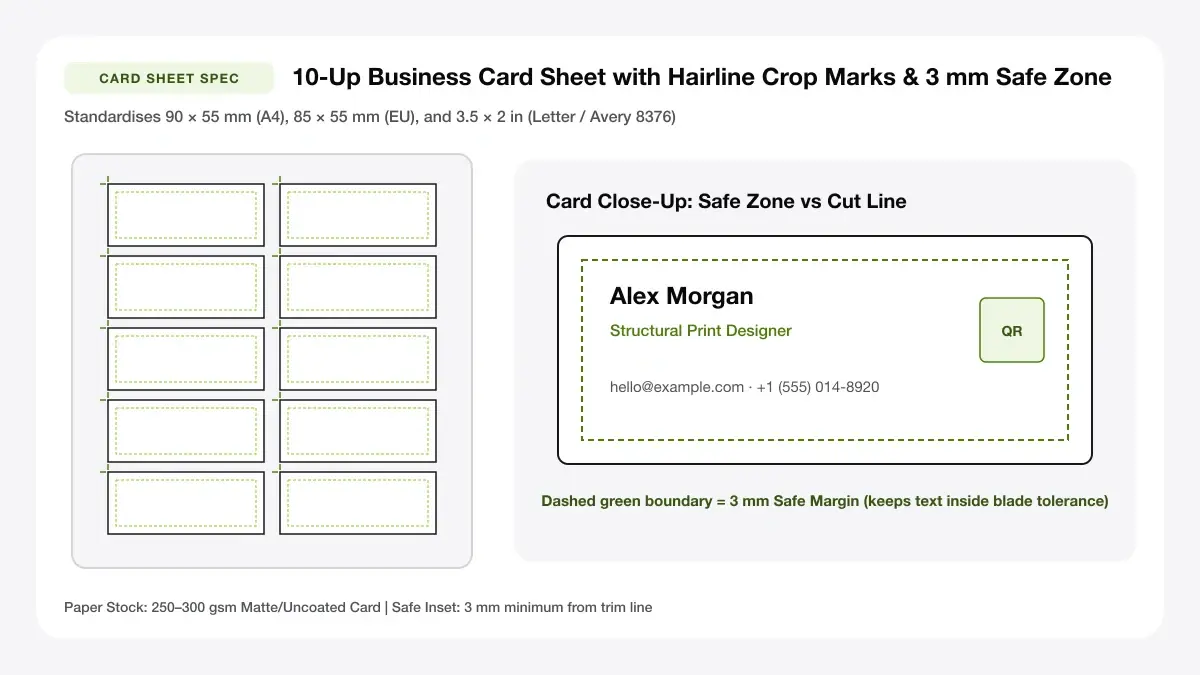
10-Up Business Card Sheet with Trim & Bleed Marks
Impose 10 standard 3.5x2 in (US) or 85x55 mm (EU/UK) cards per sheet with corner crop marks and 3 mm bleed extension.
— PRINT SHEET STUDIO —
Tools in this collection
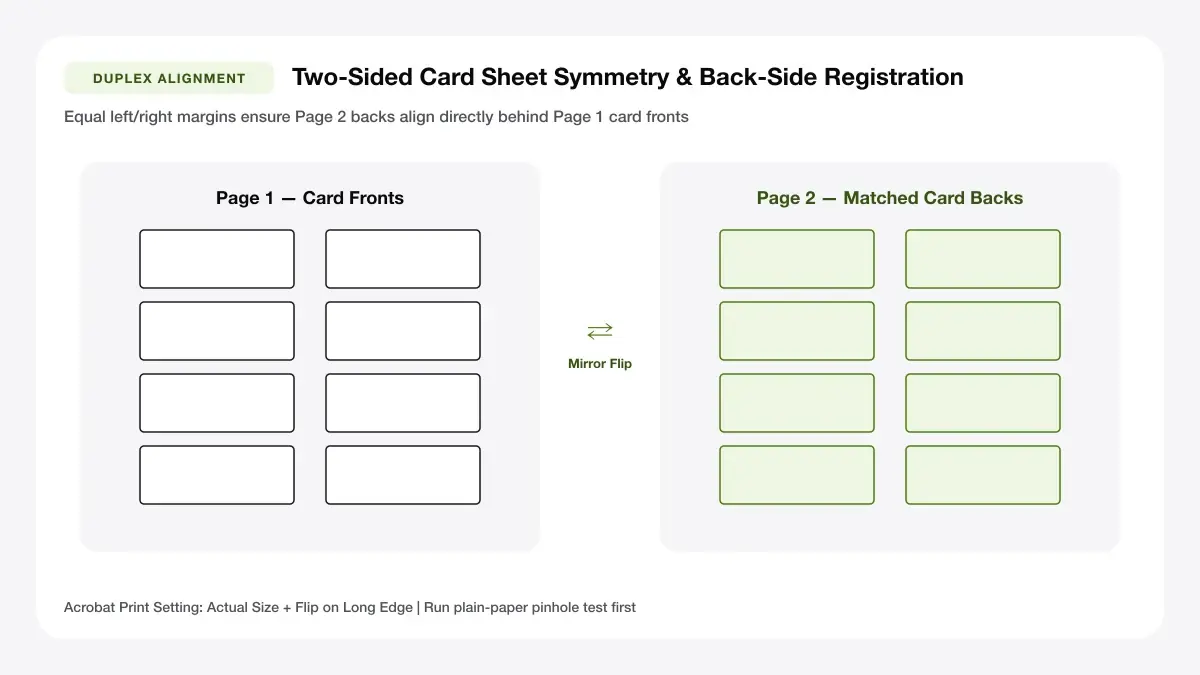
Front & Back Double-Sided Card Mirror Flip Guide
Center-mirrored front and back PDF imposition keeps double-sided card edges aligned within home duplex mechanical tolerances.
Print multiple business cards on one page
Upload an exported card image and tile 8 or 10 copies onto A4 or Letter with crop marks and double-sided support.
Printable business cards
Generate blank cut-guide card sheets or clean minimal card PDFs ready for heavy matte card stock.
Business card template
Editable blank, plain-text, and logo-plus-QR templates formatted to standard regional dimensions.
Make business cards online
Full online maker with modern minimal, classic framed, and bold accent-stripe presets plus front/back layout.
Avery business card template
Avery-compatible 8376-style Letter 10-up and A4 10-up perforated sheet layouts (independent, non-affiliated tool).
Visiting card design template
Regional visiting card and name card designer featuring QR codes for digital profiles and portfolios.
Business card design layout options
A balanced business card design layout guides the reader's eye from your name and role to the single fastest way to contact you. Avoid cramming every social handle onto a 90 × 55 mm rectangle.
Simple business card layout
A simple business card layout uses generous white space, one sans-serif or serif typeface in two weights, and a single accent colour such as dark charcoal paired with deep lime green.
Text-first and logo-first versions
Choose text-first when your name and title are the primary brand, or logo-first when your business emblem sits opposite a clean contact block.
Business card layout for printing
Any business card layout for printing needs predictable margins so a guillotine or rotary trimmer never clips letters.
Trim, bleed and safe zone
Keep all text and QR codes at least 3 mm inside the trim line (the safe zone), and extend background fills 3 mm past the trim edge if you print edge-to-edge.
Business card layout maker tools
Using a dedicated business card layout maker removes manual ruler math: the tool spaces 8 or 10 cards symmetrically on the sheet and adds subtle corner crop marks automatically.
— CHOOSE YOUR FREE GENERATOR —
Start Designing with Our Layout for Business Cards
Jump directly into our most popular browser-based sheet maker in this collection and export a millimetre-exact PDF in seconds.
Business card guides, how-tos and ideas
Explore size specifications, at-home printing tutorials, cost comparisons, and profession templates below.
Size, bleed and format
Compare US 3.5 × 2 inch, metric 90 × 55 mm, and European 85 × 55 mm specs before you export.
Print at home
Step-by-step alignment workflows for home inkjets, Canva exports, InDesign imposition, and duplex printing.
Templates by profession
Browse layout ideas tailored for students, trades, real estate agents, bakeries, and minimalist creatives.
Business card size, stock weight & sheet matrix
Match regional card dimensions cleanly to your paper tray and choose opaque cardstock thickness rated smoothly for your home feed path.
| Region / Standard | Trim Size | Sheet Grid Yield | Compatible Packs |
|---|---|---|---|
| US & Canada Standard | 3.5 × 2 in (88.9 × 50.8 mm) | 10 per Letter (2×5) | Avery 5371 / 8371 / 8871 / 28878 |
| UK & Europe ISO | 85 × 55 mm | 10 per A4 (2×5) | Avery C32011 / Plain A4 300 gsm |
| Australia & India Visiting | 90 × 50 mm / 90 × 55 mm | 10 per A4 (2×5) | Plain 280–350 gsm matte board |
| Oversized Guillotine Margin | 85 × 55 mm + 4 mm gap | 8 per Sheet (2×4) | DIY Heavy Stock with bleed |
Home inkjets vs digital copy shops
Short runs of 20 to 100 matte or silk-coated cards cost just pennies per sheet on a rear-feed pigment inkjet compared with shipping waits at commercial litho shops.
Exporting Canva & InDesign card designs
Keep names, phone numbers, and vector QR badges inset 3 mm inside card borders so single-card exports tile seamlessly onto crisp 10-up PDFs.
Frequently asked questions
What is the best layout for business cards?
The best layout for business cards places 10 cards (2 columns × 5 rows) on an A4 or Letter sheet for standard sizes, keeping at least a 3 mm inner safe margin for text and corner crop marks for clean cutting.
How do I print business cards from a template?
Pick a template tool above, enter your contact details or upload your finished card artwork, download the PDF, test one sheet on plain paper, and print onto 250–300 gsm card stock at 100% scale.
What size should my card layout be?
Use 3.5 × 2 inches (88.9 × 50.8 mm) in the US and Canada, 90 × 55 mm in Australia and India, or 85 × 55 mm across most of Europe and the UK.
— START PRINTING TODAY —
Create Your First Sheet with Print Multiple Business Cards on One Page
Pick a tool from this hub to arrange your content on A4, Letter, or 4×6 sheets and download a crisp PDF immediately.