Configurable Row, Column, Pitch & Margin Label Sheet
Build sharp rectangular labels with custom text, SKU badges, or borders tailored to any plain or die-cut sticker pack.
How to use the printable label maker in 4 steps
Use the interactive printable label maker studio above to configure a sheet grid, enter your copy, preview every row, and export a clean vector PDF.
Step 1: Choose a label size and sheet
Select A4 (210 × 297 mm) or US Letter (8.5 × 11 in) and choose a preset grid such as 2×5 (10-up), 3×8 (24-up), or a custom row and column layout that matches your pre-scored sheet.
Step 2: Add text, icons and borders
Type a label title, subtitle, and short note, or switch to an uploadable image or badge graphic. Choose solid, dashed, or clean borderless styling depending on whether you are using die-cut sheets or hand trimming.
Rectangle, square and round labels
Switch shapes to fit rectangular shipping zones, square product packaging, or circular seal stickers without changing spreadsheets or installing desktop suites.
Bold, outline and icon styles
Pair strong bold headings with thin outline cut guides or category accents so labels remain readable from a shelf distance.
Step 3: Duplicate labels across the sheet
Repeat one identical label across the whole sheet for product batches, or populate consecutive cells when organising shelves, spice racks, and office binders in a single pass.
Step 4: Download the print-ready PDF
Generate and save a vector PDF at exact millimetre scale, then print a single test run on plain paper before feeding adhesive sheets.
Printable label maker: layouts and presets
Start from three practical preset families engineered around common adhesive sheet dimensions and everyday organisation tasks.
Pantry and storage labels
Wide 63.5 × 38.1 mm (21-up) or 99.1 × 57 mm (10-up) cells give clear typographic hierarchy for flour, pasta, linen tubs, and seasonal storage boxes.
Simple text with an icon
Rectangular and square grid coordinates keep multi-purpose pantry, product, and shipping labels aligned across any blank or pre-cut sheet.
Best for home organising
Balance headline weight and legible body text alongside optional hairline borders for cleaner scissor or trimmer cuts.
Product and shop labels
Compact 3×8 (24-up) grids fit brand name, scent or flavour variant, net weight, and SKU reference neatly on kraft or matte white packaging.
Name, size and barcode zone
Rectangular and square grid coordinates keep multi-purpose pantry, product, and shipping labels aligned across any blank or pre-cut sheet.
Best for small sellers
Balance headline weight and legible body text alongside optional hairline borders for cleaner scissor or trimmer cuts.
Office and file labels
Clean high-contrast black-on-white layouts fit lever-arch spines, hanging file tabs, and warehouse bin markers with maximum legibility.
Plain, high-contrast text
Rectangular and square grid coordinates keep multi-purpose pantry, product, and shipping labels aligned across any blank or pre-cut sheet.
Best for folders and shelves
Balance headline weight and legible body text alongside optional hairline borders for cleaner scissor or trimmer cuts.
— FREE INTERACTIVE SHEET GENERATOR —
Build & Download Your Printable Label Maker PDF
Configure paper size, margins, gutters, and crop marks in real time using the printable label maker workspace above—no account or watermark.
Free printable label maker: paper size and print settings
Follow these printer and scaling rules inside the free printable label maker workflow so every sheet peels cleanly on the first try.
Page size and orientation
Verify whether your custom label sheet pack is ISO A4 or US Letter before setting row and column margins.
Using A4 or Letter label sheets
A4 printable labels (210 × 297 mm) dominate in the UK, Europe, and Australia, while US Letter (215.9 × 279.4 mm) is standard across North America. Never swap the two without updating the sheet preset.
Scale, margins and bleed
Prevent gradual row-to-row drift across full 14-up to 65-up sheets by disabling automatic PDF shrink-to-fit scaling.
Print at 100% or Actual Size
Choose Actual Size (100% scale) in your browser or PDF viewer so label pitch increments align cleanly with pre-die-cut rows.
Keep a safe margin
Maintain a 2.5 to 3 mm inner safe zone around product text and SKU corners to absorb normal home printer feed skew.
Online label maker printable: recommended settings
Set paper type in your printer driver to Labels or Heavy Matte Paper, turn off Borderless printing (which subtly enlarges artwork), and feed one adhesive sheet at a time through the rear or bypass tray. Our online label maker printable presets already include safe hardware margins.
Print quality and file format
Vector PDF generation renders fine borders, small warning type, and divider lines cleanly on 600 DPI laser or inkjet engines.
PDF versus JPG output
Avoid low-resolution screenshots of tables; native vector PDF paths preserve sharp lettering down to 6 pt nutritional or care copy.
Printable label maker online for everyday projects
A flexible printable label maker online eliminates expensive pre-printed rolls when you only need a few dozen crisp labels at a time.
Home organising and storage
Standardise spice drawers, laundry hampers, toy tubs, and garage hardware totes in matching typography across one or two A4 sheets.
Small shop product labels
Test new seasonal SKUs, sample packs, and pop-up market packaging without paying print-shop setup fees or minimum order quantities.
Classroom and office labelling
Print student tray names, book-bin categories, AV cable tags, and shared supply cupboard labels ready to apply before term starts.
Tips for cleaner, sharper prints
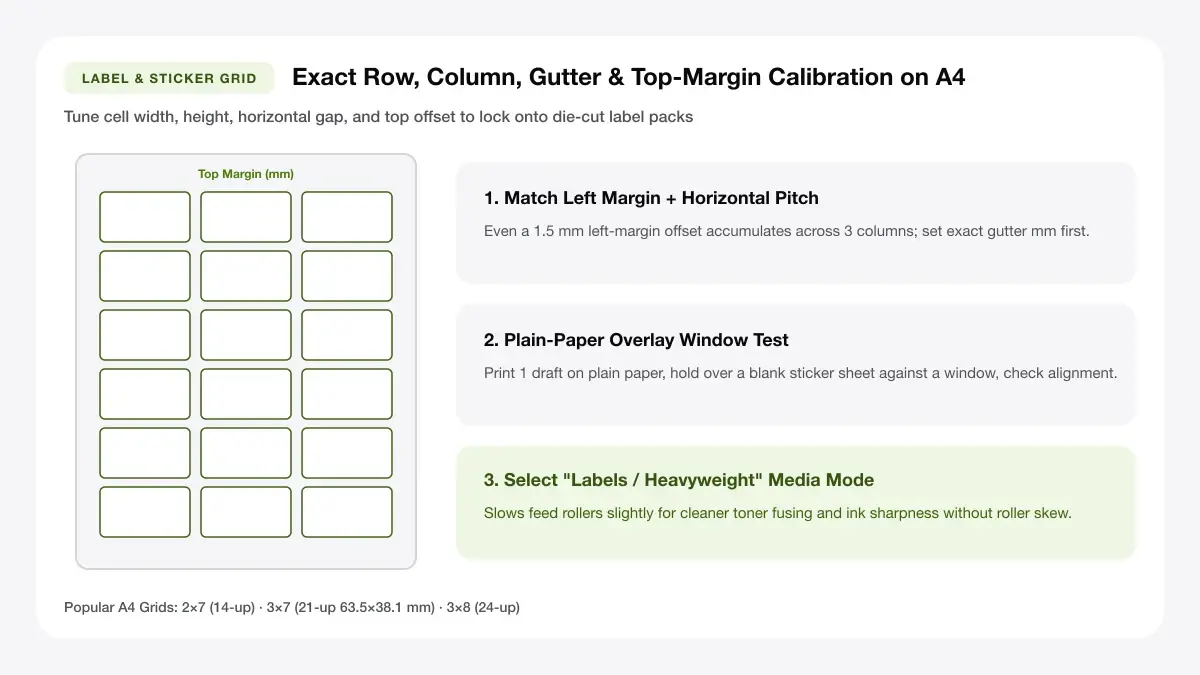
Not sure how label sheet grids translate to physical packs? Review our reference chart covering
Test one sheet on plain 80 gsm office paper held behind your adhesive sheet before feeding expensive coated label stock.
Match the label size to your sticker sheet
Measure the top margin, side margin, and gap between labels on your physical sheet before picking a grid preset.
Use matte paper for cleaner text
Matte sticker paper absorbs dye and pigment ink sharply, avoiding the slight ink spread seen on cheap glossy sheets and making small ingredients lists easy to read.
Print a test page on plain paper first
Print onto ordinary 80 gsm copy paper, hold it directly behind a blank label sheet against a window or lamp, and verify grid alignment before risking adhesive stock.
Frequently asked questions
Answers covering custom row/column geometry, paper compatibility, and true-scale PDF generation for printable labels.
Is there a free printable label maker?
Yes. Print Sheet Maker provides a free printable label maker directly in your browser with no account, watermark, or export limit, producing a product label sheet maker PDF in seconds.
How do I make labels online?
Choose your paper size and grid preset in the label maker online free printable editor above, type your label text or upload an image, verify spacing in the sheet preview, and download the print-ready PDF.
What label paper should I buy?
Match the paper coating to your printer: choose inkjet matte or inkjet vinyl for inkjet printers, and laser-rated adhesive sheets for laser printers so heat fusers do not melt the glue.
Can I print labels on a regular printer?
Yes. Any home inkjet or laser printer can print standard A4 or US Letter label sheets provided you select 'Labels' or 'Thick Paper' in the print dialog and print at 100% scale.
— EXPLORE MORE —
More print sheet tools and guides
Switch to specialized Avery A4 grids, circular lid seals, address sheets, or return to the main label studio.
A4 labels template
Generate custom rows, columns, margins, and gaps for any blank A4 label sheet.
Sticker sheet maker online
Lay out custom die-cut or kiss-cut stickers on full A4 sticker sheets.
Barcode sticker A4 sheet
Generate crisp scannable Code 128 and EAN-13 SKU sheets on A4 label paper.
Free name tag maker
Create high-contrast 8-up event badges and printable sticker name tags.
How to print multiple labels on one page
Follow step-by-step instructions for repeating one design across an entire sheet.
Label paper for printer
Compare matte, glossy, kraft, and waterproof label paper specs before ordering packs.
— PRINT-READY IN UNDER A MINUTE —
Ready to Print Your Printable Label Maker?
Jump back to the live canvas workspace above to customize your layout and download a locked-scale PDF, or explore companion tools.