Official Passport Photo Sheet Fit (A4 & Letter)
Generate biometric passport, visa, and driving license grids sized to exact millimeter dimensions on A4, Letter, or 4x6 stock.
How to use the passport photo sheet maker in 4 steps
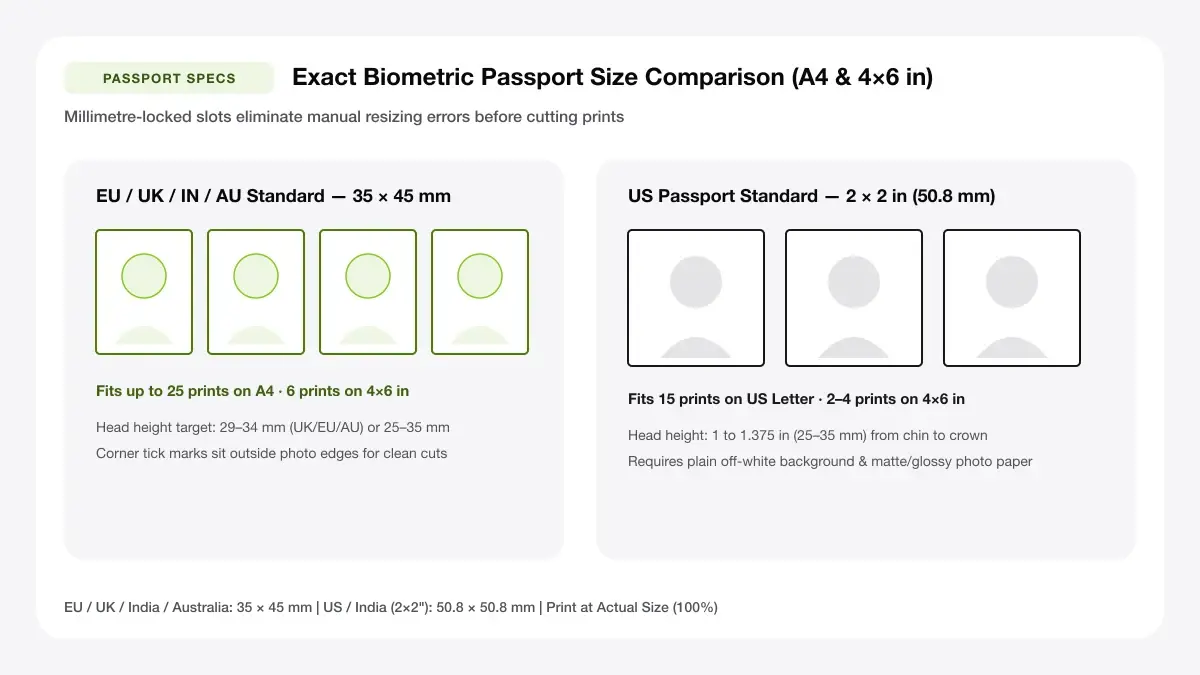
Arrange 35 × 45 mm (EU/UK/IN/AU) or 2 × 2 inch (US/India Visa) passport photos onto one compliant A4 sheet.
Step 1: Upload your passport photo
Choose your crisp plain-background ID portrait—nothing leaves your computer, keeping personal biometric photos completely private.
Step 2: Pick the photo size for your country
Pick the exact country preset (UK 35×45 mm, US 2×2 in, Schengen 35×45 mm) to fit 8, 12, or 20 photos onto A4/Letter.
Common sizes: 35x45 mm and 2x2 in
Leave A4 sheets in standard Portrait layout so multiple neat rows of 35 × 45 mm ID photos fit with clean trimming corridors.
Spacing for clean cutting
Keep 4–6 mm white spacing plus corner cut marks between passport frames so scissor cuts never bite into shoulders.
Step 3: Set the number of photos per sheet
Align the live crop box carefully so eye level and crown-to-chin proportions satisfy official country passport biometric rules.
Step 4: Download and print on A4
Export the calibration PDF and print strictly at 100% scale with Borderless turned OFF on glossy photo paper.
Passport photo sheet maker: layouts and presets
Calibrated government dimension presets enforce exact 35 × 45 mm and 51 × 51 mm bounding boxes directly in PDF coordinates.
35 x 45 mm photos (8 per sheet)
Places 8 or 16 exact 35 × 45 mm frames onto an A4 sheet—matching the standard UK, EU, Australian, and Indian passport photo dimensions.
Used in many countries
Best for visa and passport forms
2 x 2 inch photos (6 per sheet)
Arranges six 50.8 × 50.8 mm (2 × 2 in) squares centered on A4 with generous trimming room.
US-style passport size
Best for US applications
Mixed sizes on one sheet
Switch between 8-up and 16-up grids or adjust paper size to Letter when preparing multiple ID sets.
Combine two standard sizes
Best for multi-form applications
— FREE INTERACTIVE SHEET GENERATOR —
Build & Download Your Passport Photo Sheet Maker PDF
Configure paper size, margins, gutters, and crop marks in real time using the passport photo sheet maker workspace above—no account or watermark.
Passport size photo sheet maker: paper size and print settings
Embassies and passport offices reject prints off by even 2–3 mm—follow every 100% scaling setting rigidly.
Page size and orientation
Using A4
Confirm physical A4 photo paper vs US Letter cardstock selection carefully so scale never compresses vertically.
Scale, margins and bleed
Print at 100% or Actual Size
Disable Fit to Page and Borderless overscan—even 3% borderless enlargement pushes head heights outside official biometric zones.
Keep a safe margin
Maintain a generous 10–12 mm page outer margin so home inkjet rollers keep sheet corners completely flat and un-skewed.
Print multiple passport photos on one page: recommended settings
Always print on glossy or semi-gloss photo paper with Actual Size (100%) selected—never Fit to Page, which shrinks 35 × 45 mm frames by 3–5% and can cause rejection.
Print quality and file format
PDF versus JPG output
Exporting exact-scale PDF prevents kiosk or Windows print dialogs from arbitrarily cropping 35 × 45 mm photos into wide 4:3 slots.
Passport photos on A4 sheet for everyday projects
Generating multiple biometric ID copies at home saves high photo-booth charges across passports, visas, rail passes, and badges.
Passport and visa applications
A curated multi-up A4 ID sheet handles passport and visa applications with crisp backup copies left in your travel folder.
School and exam forms
A curated multi-up A4 ID sheet handles school and exam forms with crisp backup copies left in your travel folder.
ID cards and membership applications
A curated multi-up A4 ID sheet handles id cards and membership applications with crisp backup copies left in your travel folder.
Tips for cleaner, sharper prints
Critical government inspection checks—lighting, matte vs gloss stock, and millimeter verification with a ruler—before mailing.
Check your country's current photo rules before printing
Making sure you "check your country's current photo rules before printing" protects applications from frustrating biometric template rejections.
Print on glossy photo paper at 100% scale
Making sure you "print on glossy photo paper at 100% scale" protects applications from frustrating biometric template rejections.
Cut along the guides with a paper trimmer
Making sure you "cut along the guides with a paper trimmer" protects applications from frustrating biometric template rejections.
Frequently asked questions
How do I print multiple passport photos on one page?
Upload your cropped passport photo above, select 35 × 45 mm or 2 × 2 in, download the A4 PDF, and print it at 100% scale on photo paper.
What size is a passport photo?
The two most common sizes are 35 × 45 mm (UK, Europe, Australia, India) and 2 × 2 inches / 51 × 51 mm (United States). Always confirm your issuing authority's latest guidelines.
Can I print passport photos at home?
Yes, as long as your inkjet printer uses high-quality photo paper, neutral lighting/background rules are met, and you print at 100% scale.
Does this tool crop my face automatically?
No—use Crop to Fill for centered framing or prepare your head-height crop first so face proportions comply with official biometric rules.
— EXPLORE MORE —
More print sheet tools and guides
passport photo template 4x6
Format passport photos onto a 4×6 print for cheap photo-lab kiosks.
how to print multiple passport photos on one page
Step-by-step guide to cutting, scaling, and checking official rules.
arrange photos for printing
Arrange general family and event photos onto A4 sheets.
— PRINT-READY IN UNDER A MINUTE —
Ready to Print Your Passport Photo Sheet Maker?
Jump back to the live canvas workspace above to customize your layout and download a locked-scale PDF, or explore companion tools.