Fit 4 or 6 Biometric Passport Photos on One 4x6 Sheet
Turn cheap kiosk or drugstore 4x6-inch photo prints into 6 compliant passport photos for a fraction of booth pricing.
How to use the 4x6 passport photo template in 4 steps
Place 4 or 6 official passport photos onto a single cheap 4 × 6 inch (10 × 15 cm) drugstore or home photo sheet.
Step 1: Upload your passport photo
Drop your compliant passport portrait cleanly inside the browser—zero third-party uploads of sensitive identity pictures.
Step 2: Select the passport size
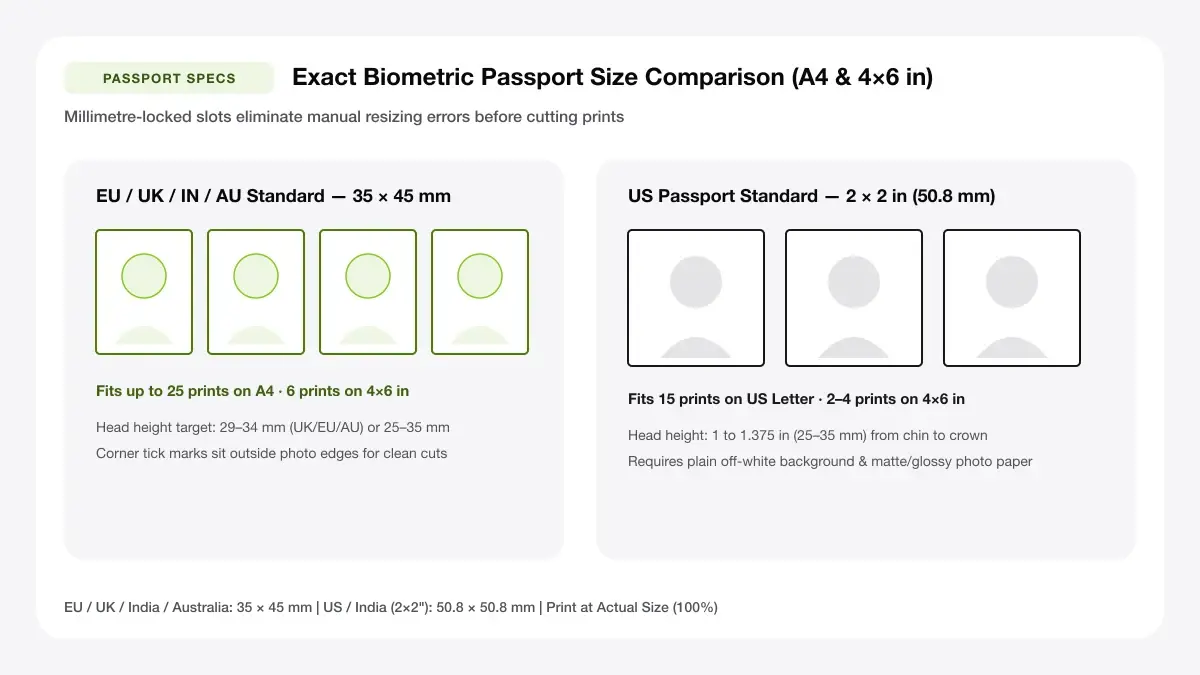
Pick 6× European/UK 35 × 45 mm photos per 4×6 sheet, or 6× compact 2 × 2 inch US frames carefully packed onto 4×6.
4x6 inch / 6x4 inch orientation
Switch the 4×6 template to Landscape for three-across columns of tall 35 × 45 mm photos (2 rows × 3 columns = 6 prints).
Safe margins for lab printers
Allow small 2–3 mm cut corridors between ID blocks, trimming cleanly with a steel straightedge after kiosk pickup.
Step 3: Fit the photos onto a 4x6 sheet
Verify neutral grey/off-white background lighting and balanced shoulder symmetry inside each preview box before exporting.
Step 4: Download and print at a photo shop
Save as a crisp PDF (or high-DPI image if uploading to a 4×6 lab print kiosk) and select uncropped 4×6 printing.
Passport photo template 4x6: layouts and presets
Our 4×6 passport sheet templates pack the maximum legal photo count onto the cheapest single photo-lab print format worldwide.
2 x 2 inch (two photos on a 4x6)
Places two exact 50.8 × 50.8 mm squares side by side inside a 4×6 landscape frame with safe outer lab margins.
Two photos with a centred gap
Best for US passports
35 x 45 mm (two photos on a 4x6)
Places up to four 35 × 45 mm metric ID frames neatly inside a 6×4 inch sheet.
Metric standard for many countries
Best for visas and IDs
Four small photos on a 4x6
Fits eight compact 25 × 35 mm stamp-style ID photos onto one 4×6 card.
Compact 25 x 35 mm size
Best for exam and club forms
— FREE INTERACTIVE SHEET GENERATOR —
Build & Download Your Passport Photo Template 4x6 PDF
Configure paper size, margins, gutters, and crop marks in real time using the passport photo template 4x6 workspace above—no account or watermark.
4x6 passport template: paper size and print settings
Photo kiosks often apply subtle 'Auto-Crop' edge zoom by default unless you disable borderless zoom at checkout.
Page size and orientation
Using 4x6 inch (102 x 152 mm)
Set paper to exact 4 × 6 inch (101.6 × 152.4 mm) when loading mini glossy trays in Canon Selphy, Epson, or HP Envy printers.
Scale, margins and bleed
Print at 100% or Actual Size
Keep 100% Actual Size scale active; Borderless auto-expansion zooms a 4×6 print ~3% and slightly enlarges the 35 × 45 mm frame.
Keep a safe margin
Leave at least a 2–3 mm safety margin around the 4×6 outer rim so kiosk roller cutters never trim outer head edges.
Arrange passport photo to 4x6 online: recommended settings
Leave at least a 4 mm outer margin on 4×6 sheets because photo kiosks often trim 1–2 mm during borderless lab printing.
Print quality and file format
PDF versus JPG output
Home inkjet printers honor exact millimeters via PDF; retail lab kiosks accept 1200 × 1800 px at 100% 'do not crop' mode.
Passport 4x6 template for everyday projects
Packing 4–6 ID prints onto a single 4×6 kiosk sheet routinely turns a $15 booth fee into a $0.35 print.
Photo-lab printing of passport photos
Lab-sized 4×6 templates let you complete photo-lab printing of passport photos locally using any drugstore photo terminal.
Drugstore and kiosk print orders
Lab-sized 4×6 templates let you complete drugstore and kiosk print orders locally using any drugstore photo terminal.
Printing on 4x6 photo printers at home
Lab-sized 4×6 templates let you complete printing on 4x6 photo printers at home locally using any drugstore photo terminal.
Tips for cleaner, sharper prints
Ruler-verify finished 4×6 passport prints at home before cutting apart and submitting with official forms.
Order as 4x6 prints and choose no auto-crop
Remembering to "order as 4x6 prints and choose no auto-crop" avoids kiosk over-cropping slicing off the sides of 2 × 2 inch photos.
Keep important edges away from the trim line
Remembering to "keep important edges away from the trim line" avoids kiosk over-cropping slicing off the sides of 2 × 2 inch photos.
Export at 300 DPI or higher
Remembering to "export at 300 dpi or higher" avoids kiosk over-cropping slicing off the sides of 2 × 2 inch photos.
Frequently asked questions
How do I arrange a passport photo to 4x6 online?
Upload your photo above, choose the 2 × 2 in or 35 × 45 mm preset, and download the 4×6 PDF sheet. No Photoshop is needed.
What is the standard passport photo template 4x6?
A standard 4×6 (6×4) sheet is 101.6 × 152.4 mm and typically holds two 2 × 2 inch photos or four 35 × 45 mm photos cleanly.
How many passport photos fit on a 4x6 print?
Two 2 × 2 inch US passport photos fit comfortably with safe margins, or up to four 35 × 45 mm metric ID photos.
Can I use this at a photo kiosk?
Yes—bring the exported 4×6 file on a phone or USB drive and select 'No Crop / Original' at the kiosk.
— EXPLORE MORE —
More print sheet tools and guides
passport photo sheet maker
Use an A4 sheet instead when printing 8 to 16 passport photos at home.
how to print multiple passport photos on one page
Full checklist for scaling, lighting, and cutting ID prints.
printable 4x6 photo template
General blank and multi-slot 4×6 photo grids.
— PRINT-READY IN UNDER A MINUTE —
Ready to Print Your Passport Photo Template 4x6?
Jump back to the live canvas workspace above to customize your layout and download a locked-scale PDF, or explore companion tools.