Printable 4x6 Photo Sheet Grid & Margin Templates
Create clean 1-up 4x6 prints, 2-up 3x4 photos, or 4-up wallet cards calibrated for standard 10x15 cm glossy paper.
How to use the 4x6 photo template maker in 4 steps
Generate clean 1-up, 2-up, or 4-up printable layouts scaled exactly for 4 × 6 inch (101.6 × 152.4 mm / 4R) paper.
Step 1: Choose a 4x6 template
Load one showcase photo or two to four snapshots for multi-up 4×6 glossy postcard printing.
Step 2: Drop in your photos
Select single full-bleed 4×6, split 2-up 3×4 inch pockets, or 4-up wallet grids tuned specifically for 4R paper.
Portrait or landscape orientation
Match Landscape 4×6 orientation for wide 3:2 DSLR photos, or Portrait 4×6 for vertical smartphone snaps.
Borders, margins and bleed
Add crisp 3–5 mm classic Polaroid-style white framing borders around edges, or tighten spacing to 2 mm for crisp splits.
Step 3: Adjust spacing, borders and crop
Check Crop to Fill carefully on 4:3 phone photos—3:2 4×6 paper trims roughly 10% off the top and bottom unless Fit Whole is on.
Step 4: Download the print-ready PDF
Download exact 4×6 PDF coordinates or double-up two 4R images onto one A4 sheet when printing at home.
Printable 4x6 photo template: layouts and presets
Each 4×6 preset respects the true 2:3 (101.6 × 152.4 mm) aspect ratio and protects image edges from aggressive lab trims.
Single full-bleed 4x6
Creates a classic single 4×6 photo template with clean optional white borders or zero-margin framing.
One photo filling the print
Best for lab prints
2-up and 4-up grids
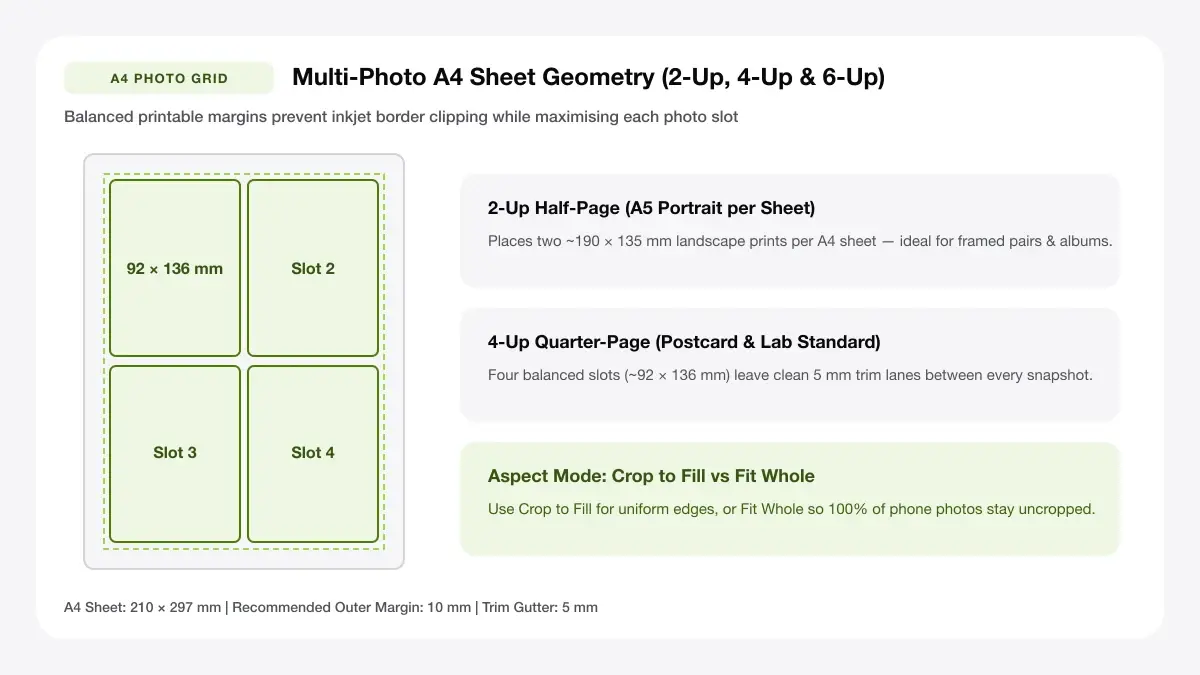
Splits a single 4×6 sheet into two 3×4 inch prints or a four-slot 4×6 photo grid for journals and mini albums.
Two or four photos on one 4x6
Best for mini prints and stickers
Card-style 4x6 template
Combines a top photo frame with a clean white bottom strip for dates, locations, or postcard greetings.
Photo plus caption area
Best for postcards and photo cards
— FREE INTERACTIVE SHEET GENERATOR —
Build & Download Your Printable 4x6 Photo Template PDF
Configure paper size, margins, gutters, and crop marks in real time using the printable 4x6 photo template workspace above—no account or watermark.
4x6 photo template: paper size and print settings
Most modern smartphone cameras shoot 4:3 rather than 3:2—choosing the right Fit mode preserves important photo heads and corners.
Page size and orientation
Using 4x6 inch (102 x 152 mm)
Feed 4×6-inch rear photo tray glossy sheets with the glossy coated side facing according to your printer feeder icon.
Scale, margins and bleed
Print at 100% or Actual Size
Use Actual Size (100%) with manual borders if framing in standard 4×6 mats, or subtle borderless mode only for scenery without text.
Keep a safe margin
Keep a minimum 4 mm white margin around split 2-up 3×4 mini-prints so separating them leaves clean edges.
4x6 photo grid: recommended settings
Keep Margin at 3–4 mm and Spacing at 3 mm when building a 2-up or 4-up 4×6 photo grid so no edge gets clipped at a drugstore kiosk.
Print quality and file format
PDF versus JPG output
PDF output handles calibrated white margins around 4R frames reliably across both home trays and photo-center uploads.
4x6 photo template for printing for everyday projects
Pre-framed 4×6 sheets make scrapbook pockets, fridge magnets, recipe cards, and thank-you postcards effortless to batch print.
Photo-lab and kiosk orders
Dedicated 4R geometry fits photo-lab and kiosk orders smoothly into standard 4×6 archival sleeves without awkward trimming.
Postcards and photo cards
Dedicated 4R geometry fits postcards and photo cards smoothly into standard 4×6 archival sleeves without awkward trimming.
Memory boards and scrapbook pages
Dedicated 4R geometry fits memory boards and scrapbook pages smoothly into standard 4×6 archival sleeves without awkward trimming.
Tips for cleaner, sharper prints
Small ratio and ink-drying tips for clean, fingerprint-free glossy 4×6 home prints.
Match the template orientation to your photos
Habitually making sure you "match the template orientation to your photos" keeps smartphone edges intact on classic 3:2 4×6 paper.
Add 3 mm bleed for full-bleed prints
Habitually making sure you "add 3 mm bleed for full-bleed prints" keeps smartphone edges intact on classic 3:2 4×6 paper.
Save as high-quality JPG or PDF
Habitually making sure you "save as high-quality jpg or pdf" keeps smartphone edges intact on classic 3:2 4×6 paper.
Frequently asked questions
Where can I get a printable 4x6 photo template?
Right here—select a 1-up, 2-up, 4-up, or caption card preset above, upload your photos, and export a free printable 4×6 PDF.
What is the size of a 4x6 photo template?
A 4×6 photo template measures 4 × 6 inches, equal to 101.6 × 152.4 mm (often sold as 4R photo paper).
Can I print a 4x6 template at home?
Yes. Load 4×6 (4R) photo paper into your inkjet's rear or photo tray, select 4×6 in the print dialog, and print at 100% scale.
How do I make a 4x6 photo grid?
Click the 2-Up or 4-Up Grid button above the preview, add your pictures, and download the finished sheet.
— EXPLORE MORE —
More print sheet tools and guides
4x6 collage maker
Build multi-frame 4×6 collages and photo-booth strips.
passport photo template 4x6
Place exact 2×2 in or 35×45 mm ID photos on a 4×6 sheet.
print multiple 4x6 photos on one page
Learn how two 4×6 (4R) prints fit onto a single A4 page.
print 4x6 photos at home
Step-by-step glossy paper feeder and driver setup guide for 4R prints.
a4 inkjet photo paper
Compare glossy, matte, and satin photo paper when cutting 4×6 from A4.
— PRINT-READY IN UNDER A MINUTE —
Ready to Print Your Printable 4x6 Photo Template?
Jump back to the live canvas workspace above to customize your layout and download a locked-scale PDF, or explore companion tools.