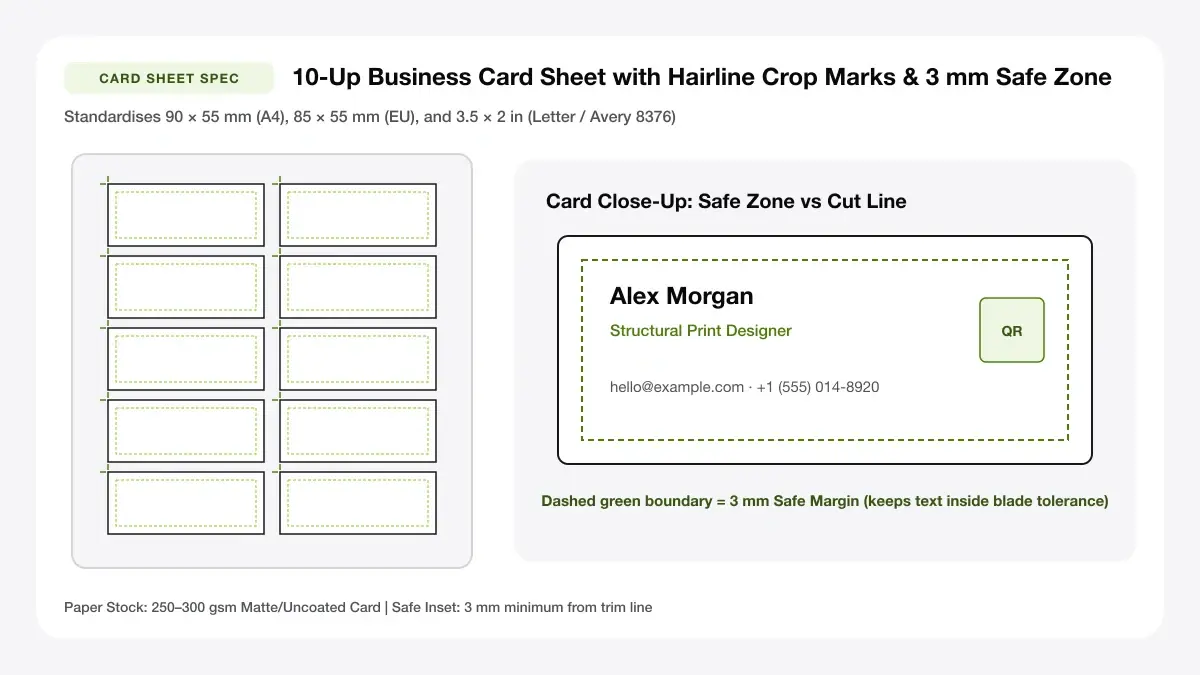
Print-Ready Business Card Template Typography & Grid
Start from balanced minimalist card templates pre-spaced at 10 cards per sheet on Letter or A4 heavy matte paper.
How to use the business card template library in 4 steps
Pick a minimal, balanced card template, edit contact details in seconds, and output a 10-card print sheet.
Step 1: Browse the template library
Swap in your company tagline, phone, email, and crisp optional vCard/URL QR badge straight inside our minimalist editor.
Step 2: Pick a blank or styled design
Confirm standard regional dimensions (US 3.5 × 2 in vs UK/EU 85 × 55 mm vs AU/IN 90 × 55 mm) before creating sheets.
Horizontal and vertical templates
Preset safe margins lock balanced typography baselines across all 10 cards evenly without drifting off grid.
Standard size and bleed
Print clean corner hairlines on heavyweight un-cut card stock to eliminate ruler math during hand slicing.
Step 3: Edit text, logo and colours
Inspect spacing between website text, role labels, and accent dividers before optionally adding a clean mirrored back.
Step 4: Download the template as PDF
Click Download PDF to grab your clean template run at 100% physical dimension—zero subscription fees.
Business card template: layouts and presets
Clean modernist card templates emphasize generous whitespace and scannable contact hierarchy over distracting clipart.
Blank business card template
An empty blank business card template grid with precise 90 × 55 mm or 3.5 × 2 inch trim guides—ideal for rubber stamps or uploading an Illustrator/PSD export.
Empty layout with guides
Best for custom designs
Plain business card template
A distraction-free plain business card template with strong hierarchy for your name, title, phone, email, and website.
Minimal text-first layout
Best for professionals
Editable template with logo area
Combines your uploaded brand logo with an automatic QR code so clients can open your portfolio or booking page instantly.
Logo, name and QR zone
Best for small businesses
— FREE INTERACTIVE SHEET GENERATOR —
Build & Download Your Business Card Template PDF
Configure paper size, margins, gutters, and crop marks in real time using the business card template workspace above—no account or watermark.
Blank business card template: paper size and print settings
Minimalist white-background card templates print remarkably cleanly at home—avoid full black ink floods that warp sheets.
Page size and orientation
Using 3.5 x 2 in or 90 x 55 mm
Feed 250–300 gsm archival matte or cream textured cardstock one or two sheets at a time via manual rear bypass slots.
Scale, margins and bleed
Print at 100% or Actual Size
Select Actual Size (100%) in Acrobat/Preview so card dimensions slide smoothly into slim leather and metal pocket wallets.
Keep a safe margin
Maintain at least 3.5 mm inner margin around fine rule dividers and corner monograms for clean uniform trim lines.
Business card templates free: recommended settings
Choose US Letter 10-up for 3.5 × 2 inch cards or A4 10-up for 90 × 55 mm cards, and always print at Actual Size (100%) so trim marks match your cutter.
Print quality and file format
PDF versus JPG output
Native vector font rendering keeps razor-crisp minimalist templates readable even at compact 6.5 pt footer sizes.
Free business card design templates for everyday projects
Structured card templates give solo founders, tutors, realtors, and photographers consistent identity sheets overnight.
Freelancers and consultants
Structured templates for freelancers and consultants help teams ship cohesive stationery across staff members in minutes.
Small shops and local services
Structured templates for small shops and local services help teams ship cohesive stationery across staff members in minutes.
Students and job seekers
Structured templates for students and job seekers help teams ship cohesive stationery across staff members in minutes.
Tips for cleaner, sharper prints
Design clarity and trimmer selection guidelines for sharp minimalist business card templates.
Keep one font family and two weights
Using "keep one font family and two weights" delivers studio-crisp card edges even from modest home desk trimmers.
Leave generous white space
Using "leave generous white space" delivers studio-crisp card edges even from modest home desk trimmers.
Export with 3 mm bleed for professional printing
Using "export with 3 mm bleed for professional printing" delivers studio-crisp card edges even from modest home desk trimmers.
Frequently asked questions
Where can I download a free business card template?
Select any preset style above, customise your text or leave it blank, and click Download 10-Card PDF to get a free business card template ready for printing.
What is a blank business card template?
A blank business card template is an empty sheet layout marked with exact card dimensions and crop guides so you can print blank frames or place custom artwork inside.
Can I edit a business card template online?
Yes. Edit every line of text, accent colour, logo, QR code, and back-side message live in your browser before exporting your PDF.
Which business card template format is best?
PDF is best for printing because it preserves exact millimetre dimensions and sharp vector text across Word, Adobe tools, home printers, and copy shops.
— EXPLORE MORE —
More print sheet tools and guides
make business cards online
Customise colours, logos, and two-sided layouts with our online card maker.
printable business cards
Download blank printable sheets or minimal cut-ready card PDFs.
business cards examples templates
Explore role-specific layouts from student cards to real estate and trades.
creative business card design ideas
Browse 25 high-contrast minimalist layouts engineered to cut cleanly at home.
— PRINT-READY IN UNDER A MINUTE —
Ready to Print Your Business Card Template?
Jump back to the live canvas workspace above to customize your layout and download a locked-scale PDF, or explore companion tools.