Print 4 Photos on One A4 or Letter Sheet (2x2 Grid)
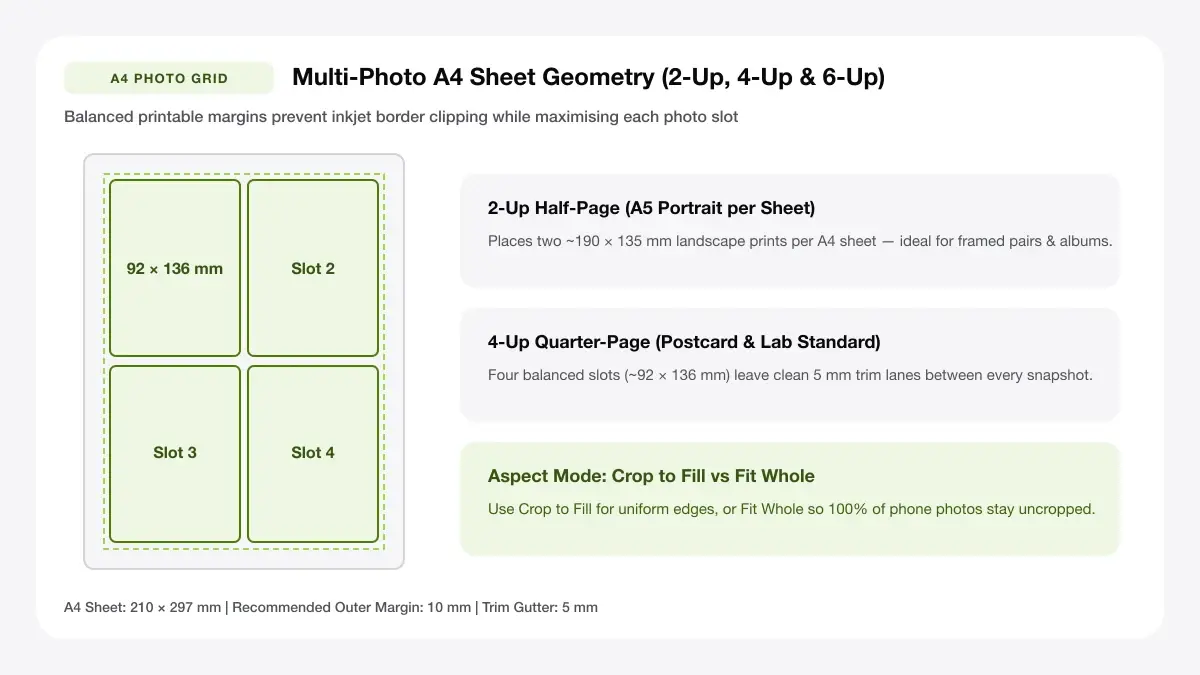
Tile four 9x13 cm (approx. 3.5x5 in) photos in a symmetric 2x2 grid on A4 or Letter cardstock with one vertical and one horizontal cut.
How to use the four-photo sheet maker in 4 steps
Arrange four crisp quadrant photos (~9 × 13 cm each) across one A4 or Letter page with a clean cross-cut guide.
Step 1: Upload four photos
Load four favorite travel shots, product photos, or event highlights directly into the live 2×2 preview workspace.
Step 2: Select the 2x2 grid or a strip layout
Activate the classic 2×2 quadrant preset or switch to a 4-strip column layout for narrow photo-booth bookmarks.
2x2 grid for a portrait A4 page
Keep Portrait orientation for vertical 3:4/2:3 phone snapshots, or toggle Landscape when printing four wide DSLR scenes.
Four horizontal strips
A 4–6 mm white cross gutter creates classic gallery borders and leaves forgiving tolerance for sliding a paper trimmer.
Step 3: Align, crop and reorder photos
Toggle Crop to Fill so all four quadrants match identical rectangle heights, or Fit Whole for mixed portrait/landscape ratios.
Step 4: Download the PDF and print
Click Download Print-Ready PDF and run it at 100% scale onto A4 photo glossy or matte presentation paper.
Print 4 photos on one page: layouts and presets
Each 4-photo grid balances vertical and horizontal symmetry so just one crosswise and one lengthwise cut finishes all four prints.
2x2 grid on A4
Divides the printable page into four identical frames so every snapshot prints at the exact same height and width.
Four equal quarters with even gutters
Best for matching photo sizes
Four stacked strips
Stacks four wide panoramic or horizontal photos down the page—great for sequential steps or photo-booth memories.
Landscape photos in a vertical stack
Best for photo-booth style prints
Four mixed-size photos
Highlights one wide hero image across the top with three matching detail shots aligned below.
One tall photo and three small ones
Best for collage-style pages
— FREE INTERACTIVE SHEET GENERATOR —
Build & Download Your Print 4 Photos on One Page PDF
Configure paper size, margins, gutters, and crop marks in real time using the print 4 photos on one page workspace above—no account or watermark.
Print 4 pictures on one page: paper size and print settings
With four quadrants sharing vertical height, fit-to-page driver squeezing leaves thinner left-right borders than top-bottom.
Page size and orientation
Using A4 or Letter
Lock the same paper size (A4 or US Letter) in both browser tool controls and your operating system print dialog.
Scale, margins and bleed
Print at 100% or Actual Size
Force 100% / Actual Size scaling so all four prints measure uniform ~9 × 13 cm dimensions ready for small desktop frames.
Keep a safe margin
A 6–8 mm outer page border keeps corner frames safely inside non-borderless office laser and home inkjet mechanical feed paths.
Print 4 images on one page: recommended settings
For standard A4 photo paper, keep margins at 10 mm and spacing at 5 mm so each 2×2 cell measures roughly 92 × 136 mm—a crisp postcard-friendly proportion.
Print quality and file format
PDF versus JPG output
PDF delivery holds crisp white border symmetry across Windows and macOS print queues where JPG photo wizards add auto-crops.
How to print four pictures on one page for everyday projects
Four-up sheets hit the sweet spot between vivid snapshot detail and economical ink-per-print cost for craft projects.
Photo albums and journals
Four-quadrant formatting keeps photo albums and journals uniform in scale and quick to slice in under thirty seconds.
School displays and class projects
Four-quadrant formatting keeps school displays and class projects uniform in scale and quick to slice in under thirty seconds.
Cutting four small prints from one sheet
Four-quadrant formatting keeps cutting four small prints from one sheet uniform in scale and quick to slice in under thirty seconds.
Tips for cleaner, sharper prints
Use these four-shot formatting habits to keep color consistency and straight cuts clean across every 2×2 print.
Use photos of similar brightness for a balanced page
Remembering to "use photos of similar brightness for a balanced page" prevents mismatched image orientations from turning side-by-side quadrants sideways.
Keep gutters at 5 to 10 mm if you plan to cut
Remembering to "keep gutters at 5 to 10 mm if you plan to cut" prevents mismatched image orientations from turning side-by-side quadrants sideways.
Print a test page on plain paper first
Remembering to "print a test page on plain paper first" prevents mismatched image orientations from turning side-by-side quadrants sideways.
Frequently asked questions
How do I print 4 pictures on one page?
Click Add Photos to upload your four pictures, keep the 2×2 Equal Grid active, and export the print-ready PDF. Open the PDF and print at 100% scale.
How to print four photos on one page?
Whether you start from phone photos or DSLR exports, this 2×2 maker resizes all four frames uniformly onto one A4 or US Letter page with no login.
How to print 4 photos per page?
Choosing the 2×2 grid puts exactly four photos per page. If you have more than four photos, run a second sheet in seconds.
Can I print 4 different photos on one page?
Yes—you can upload four completely different photos, reorder them with Cycle, and switch between Crop to Fill and Fit Whole anytime.
— EXPLORE MORE —
More print sheet tools and guides
print 2 photos on one page
Need larger half-page prints? Switch to our two-photo maker.
arrange photos for printing
Fit 6, 8, 9, or 10 photos onto a single A4 or A3 sheet.
printable 4x6 photo template
Create 4×6 lab-ready photo grids and bordered prints.
— PRINT-READY IN UNDER A MINUTE —
Ready to Print Your Print 4 Photos on One Page?
Jump back to the live canvas workspace above to customize your layout and download a locked-scale PDF, or explore companion tools.