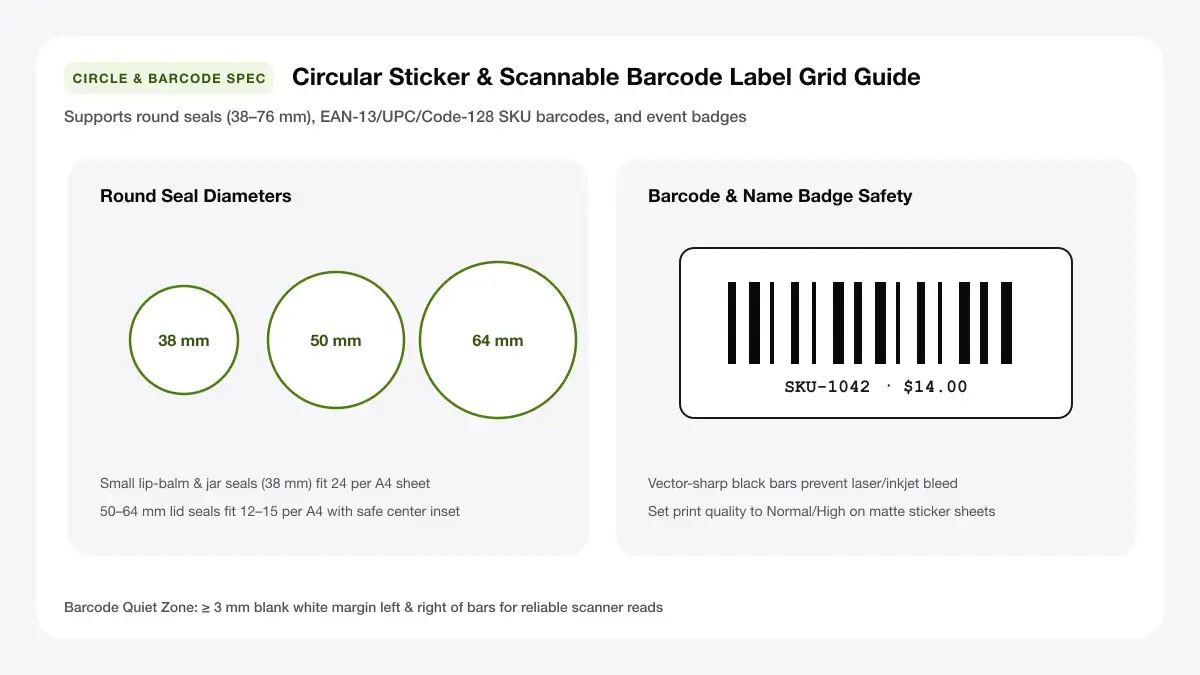
Round Sticker Diameter Grid (25 mm to 63.5 mm)
Create circular favor stickers, bottle lid seals, and bakery toppers from 25 mm up to 63.5 mm with centered circular trim outlines.
How to use the circle label sheet maker in 4 steps
Set up circular seals and jar lid decals cleanly in four fast steps with live sheet previews.
Step 1: Choose a circle diameter
Pick a preset circle diameter or type a custom diameter in millimetres to match your pre-cut round label pack or lever circle punch.
Step 2: Add text, logo or artwork
Type short centred lines (brand, flavour, date) or upload a crisp square PNG logo that scales smoothly inside the circular safe zone.
Common diameters: 25, 40, 50 and 60 mm
25 mm works for envelope seals and tiny cosmetic lids; 40–50 mm suits standard mason jar caps and gift bags; 60–75 mm fits wide candle lids and takeaway boxes.
Bleed beyond the circle edge
When printing tinted backgrounds on pre-cut round sheets, extend colour slightly outside the perimeter or keep artwork safely inside a white border.
Step 3: Fill the sheet with circles
Choose how many columns and rows fit comfortably on A4 or Letter with clean cut gaps around every circle.
Step 4: Download the PDF and print
Save the print-ready PDF and run a quick test page on copy paper held behind your round label sheet.
Round labels for printer: layouts and presets
Pick one of these diameter-tuned round labels for printer layouts to maximise labels per page without crowding cut edges.
Small circles (25 mm)
Compact 25 mm discs pack densely on an A4 sheet, ideal for tissue-paper seals, reward stars, spice cap dots, and lip-balm bases.
About 48 per A4 sheet
Circular label geometry centers diameter rings evenly across A4 or Letter stock from tiny 25 mm seals up to 63.5 mm toppers.
Best for seals and badges
Use subtle concentric outer borders only as visual punch targets on uncut vinyl, and hide them when using pre-punched circles.
Medium circles (50 mm)
Balanced 50 mm rounds give ample room for an event monogram, batch date, or handmade soap brand stamp without dominating small lids.
About 15 per A4 sheet
Circular label geometry centers diameter rings evenly across A4 or Letter stock from tiny 25 mm seals up to 63.5 mm toppers.
Best for jar lids and favours
Use subtle concentric outer borders only as visual punch targets on uncut vinyl, and hide them when using pre-punched circles.
Large circles (60 mm)
Bold 60 mm discs stand out clearly on pastry boxes, mailer tubes, gift hampers, and wide candle tins.
About 12 per A4 sheet
Circular label geometry centers diameter rings evenly across A4 or Letter stock from tiny 25 mm seals up to 63.5 mm toppers.
Best for packaging and gifts
Use subtle concentric outer borders only as visual punch targets on uncut vinyl, and hide them when using pre-punched circles.
— FREE INTERACTIVE SHEET GENERATOR —
Build & Download Your Round Labels for Printer PDF
Configure paper size, margins, gutters, and crop marks in real time using the round labels for printer workspace above—no account or watermark.
Circle labels for printer: paper size and print settings
Follow these alignment guidelines so your circle labels for printer sheets come out crisp and evenly framed.
Page size and orientation
Confirm circle sheet paper size (A4 210×297 mm vs US Letter 8.5×11 in) so top-left circle centers never clip diagonally.
Using A4 or Letter
Check whether your circle label sheets are cut to ISO A4 (210 × 297 mm) or US Letter (8.5 × 11 in). Matching the document page size prevents vertical cumulative drift on rows 4 through 7.
Scale, margins and bleed
Even a 3% print-driver shrink turns 50 mm jar seals into 48.5 mm circles that miss recessed metal lid rings.
Print at 100% or Actual Size
Ensure Actual Size (100%) is active in the print dialog so circular diameters match craft hole punches and lid recesses accurately.
Keep a safe margin
Keep curved text arcs and brand logos 3 mm inside the circle circumference because circular cuts reveal off-center shifts fast.
Print quality and file format
True circular vector curves print velvety smooth on round sticker packs without jagged stepped PNG edges.
PDF versus JPG output
Direct PDF vector circles stay razor clean when shrunk down to 25 mm soap seals or scaled up to 75 mm bakery box closures.
Label printer round labels for everyday projects
Desktop label printer round labels give makers, bakeries, and event hosts full-colour branding without thermal monochrome limits.
Jar lids and gift seals
Cap honey, jam, candle, and bath-salt lids with clean circular seals that list scent, roast date, or event thank-you notes.
Product packaging
Seal kraft bakery boxes, coffee pouches, and mailer envelopes with round logo stickers printed in small fresh batches.
Classroom badges and crafts
Create colour-coded reading level stickers, science kit markers, and craft fair price dots directly from your browser.
Tips for cleaner, sharper prints
Need help pairing sheet diameters with standard packaging? Check our full dimensions guide for
Check radial centering on a 1-page test print before punching or feeding gloss vinyl circular packs.
Print slightly past the circle edge for clean cuts
If your design fills the circle with a solid colour, bleeding 1–2 mm past the cut boundary prevents thin white crescents when die-cut sheets shift slightly.
Use a circle punch for perfect shapes
Printing onto full uncut sticker sheets and punching out circles with a 25 mm, 38 mm, or 50 mm craft lever punch guarantees zero printer-alignment headaches.
Choose waterproof sticker paper for kitchen use
For cold bottles, chilled jars, or hand-washed containers, pick matte waterproof vinyl sticker paper compatible with your inkjet or laser printer.
Frequently asked questions
Helpful guidance on diameter measurements, radial safe zones, and matching circular label sheets at home.
Can I print round labels on a normal printer?
Yes. Any home inkjet or laser printer handles round labels for printer sheets cleanly when loaded one sheet at a time and printed at 100% Actual Size.
What size round labels should I use?
Choose 25 mm for envelope seals and tiny dropper lids, 38–50 mm for standard jam or mason jar lids, and 60–75 mm for candle lids, bakery boxes, and pouches.
How many circles fit on an A4 sheet?
About 48 circles of 25 mm diameter, 24 circles of 40 mm diameter, 15 circles of 50 mm diameter, or 12 circles of 60 mm diameter fit cleanly on one A4 sheet with cut spacing.
Can I cut circle labels without a machine?
Yes. Either buy pre-scored circular label sheets compatible with standard A4 templates, or print onto full uncut sticker sheets and punch them quickly with a hand craft circle punch.
— EXPLORE MORE —
More print sheet tools and guides
Pair circular top seals with rectangular wrap jars, custom A4 grids, or die-cut sticker sheets.
Sticker sheet maker online
Build mixed sticker sheets and full-page sticker layouts for inkjet or laser printers.
Printable label maker
Create rectangular and square labels for pantries, products, and office shelves.
Mason jar labels printable
Design matching body and lid labels sized specifically for wide-mouth and regular mason jars.
Print multiple stickers on A4
Walk through round and custom kiss-cut vinyl print settings step by step.
— PRINT-READY IN UNDER A MINUTE —
Ready to Print Your Round Labels for Printer?
Jump back to the live canvas workspace above to customize your layout and download a locked-scale PDF, or explore companion tools.