Arrange Multiple Photos on One A4 or Letter Sheet
Drop heterogeneous photos into a uniform multi-up grid on A4, Letter, or 4x6 paper without cropping subjects unexpectedly.
How to use the photo sheet maker in 4 steps
Arrange mixed portrait and landscape images onto one sheet inside your browser in four quick steps—no layout software needed.
Step 1: Upload your photos
Batch-select 3, 6, 8, 9, or 10 JPG, PNG, or WebP pictures directly from desktop folders or phone camera rolls.
Step 2: Pick a sheet size and grid
Tap the 2×2, 3×2, 3×3, or 5×2 preset grid matching how many photos you want per A4, A3, or Letter page.
Choose A4, A3 or Letter
Match sheet orientation (Portrait vs Landscape) to whether most uploaded shots are tall verticals or wide horizontals.
Set rows, columns and gutters
Use a 4–8 mm cut gutter when separating individual prints with scissors, or set 0–2 mm spacing for tight contact-sheet catalogs.
Step 3: Adjust spacing, crop and order
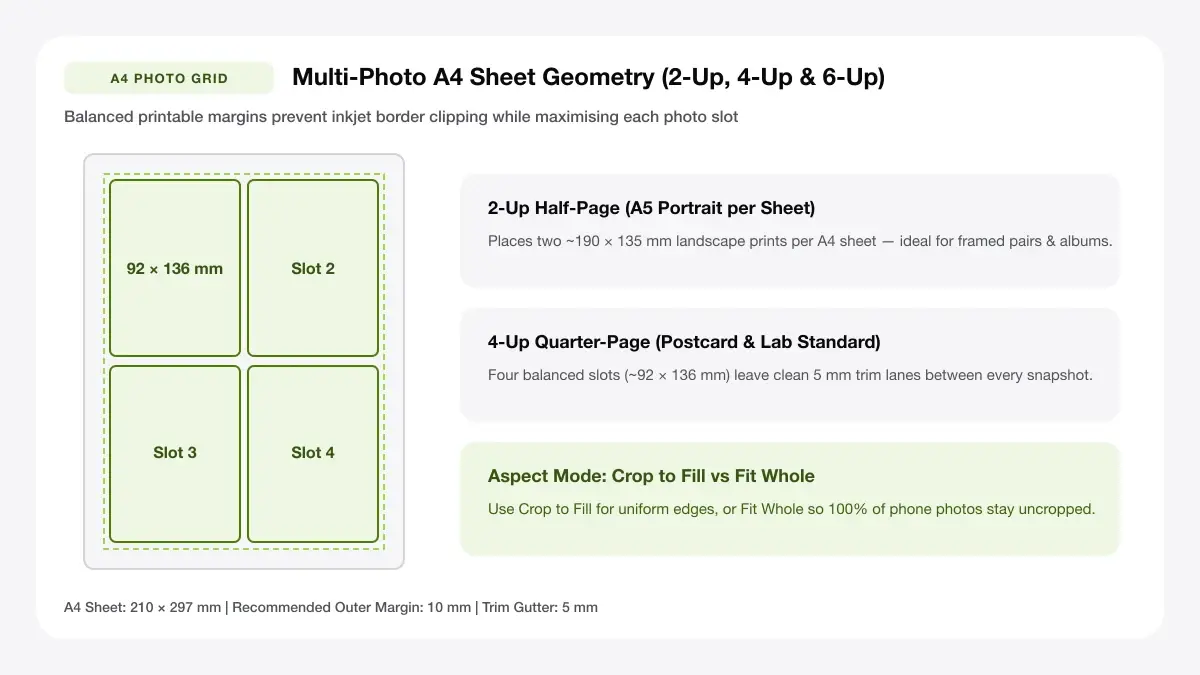
Choose Crop to Fill for sleek equal rectangles, or switch to Fit Whole to preserve full wide-angle edges without trimming.
Step 4: Download the print-ready PDF
Download the locked-scale PDF and print at 100% / Actual Size so multi-photo frames hold clean, uniform proportions.
Arrange photos for printing: layouts and presets
Each preset calculates multi-up photo frames and margins automatically so 3 to 10 pictures balance across the sheet.
Equal-size photo grid
Place multiple photos in one A4 paper grid with identical frame widths. Ideal when you want to print 3 photos on one page, print 6 pictures per page, or fit up to 10 snapshots onto one sheet.
6, 8, 9 or 10 photos per page
Best for albums and contact sheets
Mixed-size photo layout
Feature one large focal image on the top half of the page alongside four smaller detail frames below—perfect when you need to print different size photos on one page.
One hero photo plus small prints
Best for scrapbooks and posters
Merged photo strip
Set spacing to 0–2 mm to merge image on one page into a clean horizontal or vertical comparison strip.
Two or three photos joined edge to edge
Best for before-and-after pages
— FREE INTERACTIVE SHEET GENERATOR —
Build & Download Your Arrange Photos for Printing PDF
Configure paper size, margins, gutters, and crop marks in real time using the arrange photos for printing workspace above—no account or watermark.
Arrange photos for printing online: paper size and print settings
Even crisp multi-photo sheets shrink asymmetrically if browser PDF drivers override margins. Lock these tray settings first.
Page size and orientation
Using A4, A3 or Letter
Confirm A4, A3, or US Letter selection in your print dialog matches the exact paper pack sitting in your inkjet tray.
Scale, margins and bleed
Print at 100% or Actual Size
Turn off Fit to Printable Area or Shrink Oversized Pages so your calculated photo grid holds exact printed centimetres.
Keep a safe margin
Keep an 8–10 mm outer sheet margin when printing onto borderless-incapable office trays so outer photo rims are never clipped.
Print different photos on one page: recommended settings
When you arrange multiple photos on one page online, choose A4 (210 × 297 mm) with a 10 mm outer margin and 5 mm gutter for general home inkjets, or switch to A3 when printing large 10-photo contact sheets.
Print quality and file format
PDF versus JPG output
Native PDF locks millimeter frame placement across copy shops and laptops, whereas raw JPG files depend on erratic DPI tags.
Combine photos in one page for everyday projects
Grouping multiple shots onto one A4 or A3 sheet cuts specialty glossy photo paper costs sharply across everyday projects.
Family albums and school projects
Consolidating photos for family albums and school projects onto a single master PDF speeds up cutting and keeps frame widths consistent.
Product and listing photos
Consolidating photos for product and listing photos onto a single master PDF speeds up cutting and keeps frame widths consistent.
Reference and mood-board sheets
Consolidating photos for reference and mood-board sheets onto a single master PDF speeds up cutting and keeps frame widths consistent.
Tips for cleaner, sharper prints
Apply these quick pre-print checks to keep skin tones accurate and frame edges crisp on heavyweight photo paper.
Match photo orientation before you arrange
Prioritizing "match photo orientation before you arrange" saves glossy ink sheets from awkward aspect-ratio clipping or soft 72 DPI stretching.
Leave a 5 mm safe margin for home printers
Prioritizing "leave a 5 mm safe margin for home printers" saves glossy ink sheets from awkward aspect-ratio clipping or soft 72 DPI stretching.
Export as PDF to keep the layout locked
Prioritizing "export as pdf to keep the layout locked" saves glossy ink sheets from awkward aspect-ratio clipping or soft 72 DPI stretching.
Frequently asked questions
Can I print different photos on one page?
Yes. Upload as many distinct JPG or PNG files as you need—each grid slot accepts a different photo so you can print different photos on one page cleanly.
How do I combine photos in one page?
Upload your files in Step 1, choose a preset grid (or click Cycle to reorder slots), and export the combined PDF sheet. It is the fastest way to combine images in one page without editing layers.
Is it free to arrange photos for printing online?
Yes. You can arrange photos for printing online completely free with no account, daily limit, or watermark.
How many photos fit on an A4 sheet?
An A4 printable photo layout comfortably holds 2 large 4×6 prints, 4 album prints, 6–8 journal snapshots, or 9–10 wallet-sized pictures per page.
— EXPLORE MORE —
More print sheet tools and guides
print 4 photos on one page
Dedicated 2×2 and 4-strip maker for four-photo sheets.
print picture multiple times on one page
Duplicate one photo across 4 to 16 identical wallet or tag slots.
a4 collage maker
Build decorative A4 collages with titles and custom borders.
print big picture on multiple pages
Split one large photo into multi-page wall poster tiles.
software to print multiple photos on one page
Compare browser photo grid makers with desktop print apps.
how to print multiple images on one page in photoshop
Compare Lightroom and Photoshop Contact Sheet II against browser grids.
how to print multiple pictures on one page epson iprint
Walk through mobile multi-photo layouts with Epson iPrint vs A4 PDF.
— PRINT-READY IN UNDER A MINUTE —
Ready to Print Your Arrange Photos for Printing?
Jump back to the live canvas workspace above to customize your layout and download a locked-scale PDF, or explore companion tools.