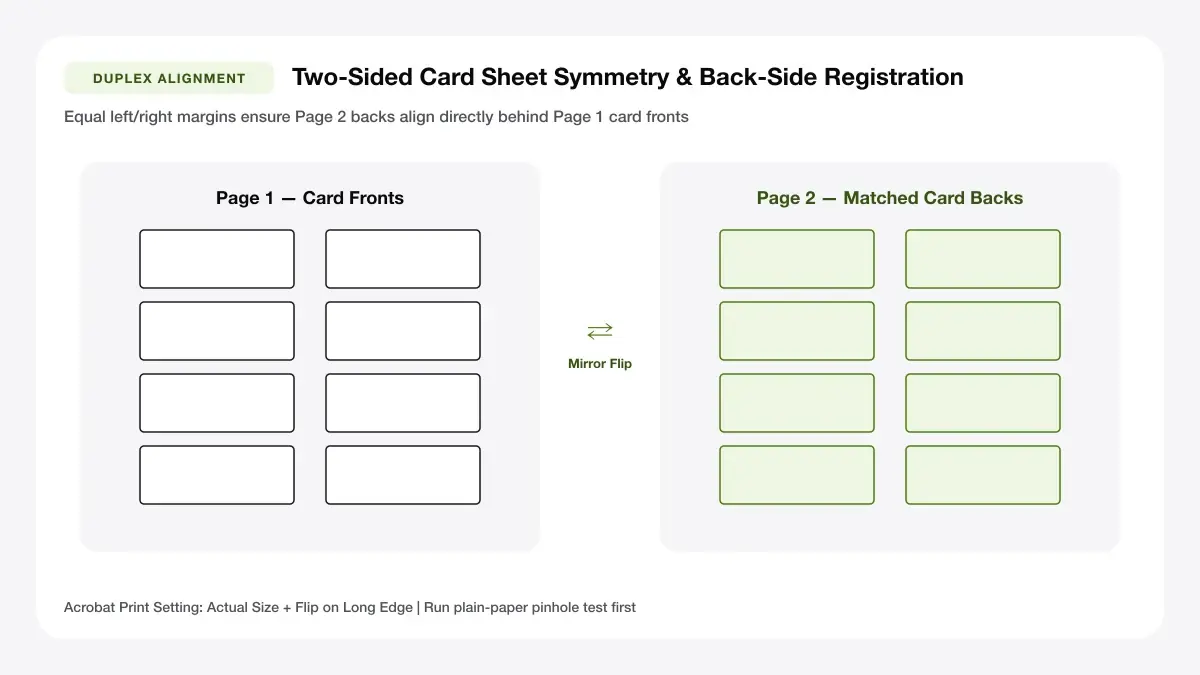
Double-Sided Business Card Sheet Alignment Blueprint
Design custom single-sided or mirrored double-sided business cards with QR codes and instant 10-up PDF download.
How to use the business card maker in 4 steps
Compose single-sided or mirrored double-sided business cards directly online with live QR code encoding.
Step 1: Start a new card
Type contact lines or upload custom square artwork; toggle on the instant vector QR generator for portfolio or booking links.
Step 2: Add your logo, name and contact details
Select 10-up A4 or Letter imposition matching your card dimensions and dual-sided flip paper stock.
Fonts and colour pairs
Double-sided mode calculates mirror-reversed Page 2 columns automatically so Page 1 and Page 2 match back-to-back.
Front and back sides
Print hairline cut marks ONLY on the front page—never double print trim lines on the back where feed drift shows.
Step 3: Choose fonts, colours and layout
Inspect both the front contact panel and optional back tagline/appointment card side-by-side before exporting.
Step 4: Download the print-ready PDF
Save the 2-page duplex PDF and print Page 1 first, flip along the long edge cleanly, and verify on plain paper first.
Make business cards online: layouts and presets
Modern online card layouts pair bold vector QR contact shortcuts with scannable single-column contact lines.
Modern minimal card
A crisp top accent bar paired with left-aligned contact lines and generous white space.
Clean type, one accent colour
Best for consultants and creatives
Classic professional card
A centred, thin-framed layout with timeless balance for traditional professions.
Serif type, centred layout
Best for finance and legal
Bold logo-first card
A strong vertical colour stripe on the left paired with your logo and high-contrast contact details.
Large logo, short details
Best for shops and trades
— FREE INTERACTIVE SHEET GENERATOR —
Build & Download Your Make Business Cards Online PDF
Configure paper size, margins, gutters, and crop marks in real time using the make business cards online workspace above—no account or watermark.
Make business cards online free: paper size and print settings
Two-sided home printing introduces 1–2 mm mechanical roller drift—design card backs cleanly to forgive slight tolerances.
Page size and orientation
Using 3.5 x 2 in or 90 x 55 mm
Use opaque 280–300 gsm uncoated or matte coated double-sided cardstock so dark print never shows ghosted through paper.
Scale, margins and bleed
Print at 100% or Actual Size
Keep scaling locked strictly at 100% across both Page 1 and Page 2; tiny scale differences break back-to-back alignment.
Keep a safe margin
Allow a generous 4 mm inner margin on double-sided designs and avoid tight full-bleed color borders on home printers.
Create business cards free online: recommended settings
Choose an accent colour with strong contrast on white card stock (like lime-700, charcoal, or navy), enable Crop marks, and print Page 1 + Page 2 if you include a card back.
Print quality and file format
PDF versus JPG output
Single 2-page PDF bundles exact vector front typography alongside razor-sharp SVG-derived QR matrices on Page 2.
Design your business card online free for everyday projects
Creating custom cards completely online removes designer turnaround wait times when numbers, roles, or QR pages change.
New businesses and startups
Instant browser authoring makes new businesses and startups effortless right before networking mixers or client pitches.
Freelancers building a portfolio
Instant browser authoring makes freelancers building a portfolio effortless right before networking mixers or client pitches.
Event teams that need fast cards
Instant browser authoring makes event teams that need fast cards effortless right before networking mixers or client pitches.
Tips for cleaner, sharper prints
Duplex orientation testing and QR sizing checks so phones scan every printed business card instantaneously.
Limit the card to the details people really need
Completing "limit the card to the details people really need" catches short-edge vs long-edge flip mixups before wasting thick cardstock.
Check contrast so text stays readable
Completing "check contrast so text stays readable" catches short-edge vs long-edge flip mixups before wasting thick cardstock.
Download a PDF proof before printing
Completing "download a pdf proof before printing" catches short-edge vs long-edge flip mixups before wasting thick cardstock.
Frequently asked questions
Can I make business cards online for free?
Yes. You can make business cards online free with zero sign-up, zero watermarks, and unlimited edits right in your browser.
How do I design my business card online?
Pick Modern Minimal, Classic Framed, or Bold Stripe above, fill in your contact fields, optionally add a logo and QR code, and click Download 10-Card PDF.
Can I add my logo to a business card online?
Yes—click the Logo button to upload a PNG or JPG logo and it will appear cleanly on every card across the print sheet.
Can I print the cards at home?
Yes. Print the exported PDF onto 250–300 gsm card stock at 100% scale and trim along the corner crop marks.
— EXPLORE MORE —
More print sheet tools and guides
business card template
Start from a blank or plain printable card template.
printable business cards
Print blank sheets or minimal cards straight from your browser.
visiting card design template
Design regional visiting cards and name cards with QR links.
print double sided business cards at home
Prevent upside-down or shifted card backs with our 1-minute duplex flip test.
creative business card design ideas
Discover clean QR, typographic, and monochrome card layout concepts.
home business card printer
Compare home cardstock ink costs vs ordering finished batches locally.
— PRINT-READY IN UNDER A MINUTE —
Ready to Print Your Make Business Cards Online?
Jump back to the live canvas workspace above to customize your layout and download a locked-scale PDF, or explore companion tools.