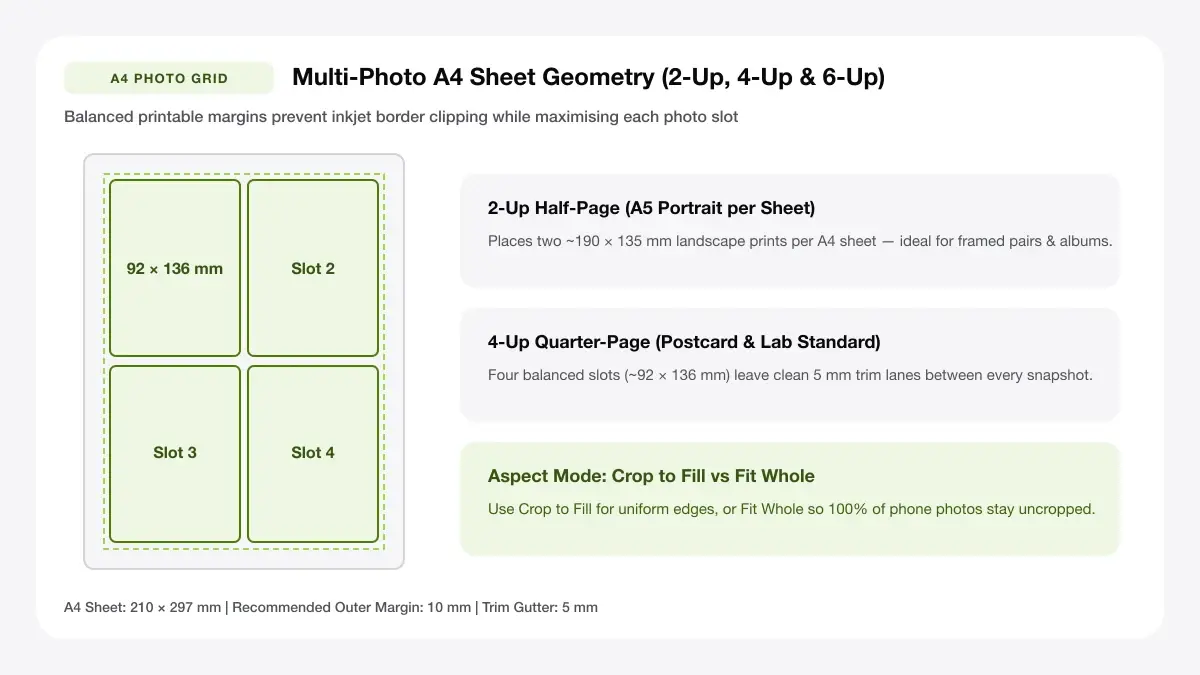
A4 Multi-Up Photo Layout Grid & Cut Gutters
Arrange 2, 4, 6, or 9 photos on A4, US Letter, or 4x6 glossy paper with equal cut gutters and zero aspect-ratio distortion.
— PRINT SHEET STUDIO —
Tools in this collection
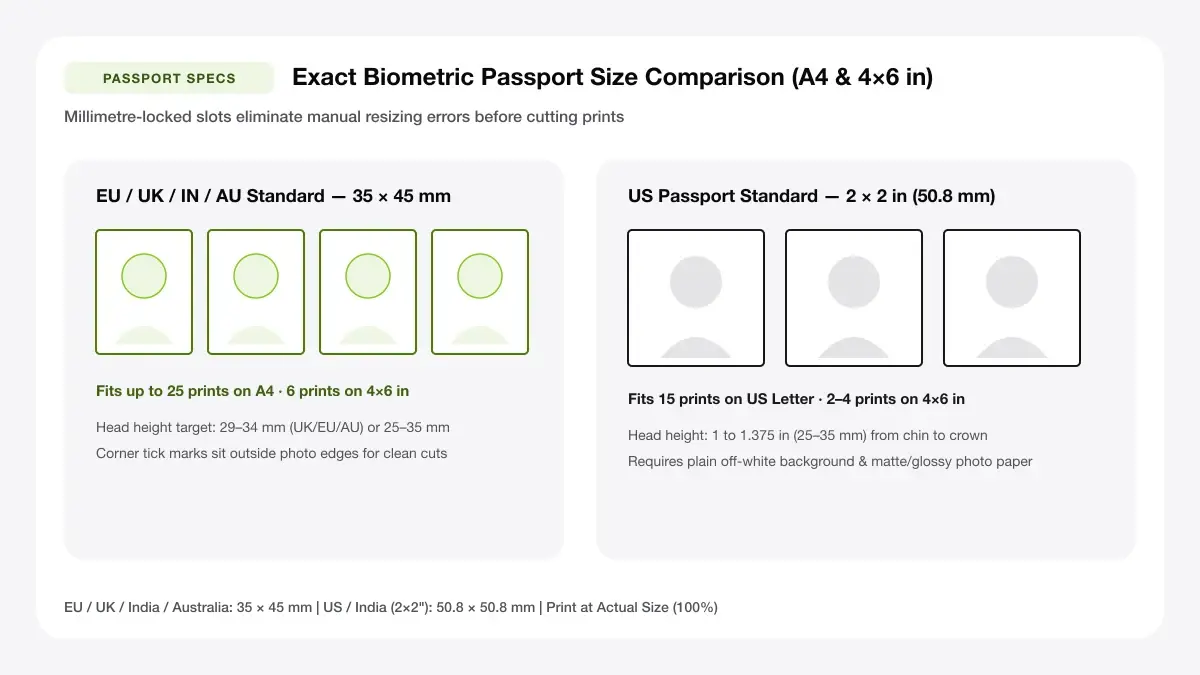
35x45 mm & 2x2 in Passport Photo 4x6 and A4 Sheet Geometry
Generate biometric 35x45 mm or 2x2 inch ID photo sheets tiled cleanly onto 4x6-inch photo paper or full A4 sheets.
Arrange photos for printing
Flexible A4, A3, and Letter multi-photo grid maker for 3, 5, 6, 8, 9, or 10 photos per page plus mixed hero layouts.
Print 2 photos on one page
Two-photo sheet maker with stacked portrait, side-by-side landscape, and 60/40 split presets.
Print 4 photos on one page
Four-photo sheet maker supporting 2×2 grids, 4 vertical strips, and 1-large-plus-3-small layouts.
Print picture multiple times on one page
Upload one photo once and repeat it 2, 4, 9, or 12 times across an A4 or Letter sheet with cut marks.
Print big picture on multiple pages
Poster splitter that tiles any large image across 2×2, 3×3, or custom sheet grids with tape overlap.
Passport photo sheet maker
Arrange 35 × 45 mm or 2 × 2 inch passport photos onto an A4 sheet with precise trim guides.
Passport photo template 4x6
Place 2, 4, or 8 ID-sized photos onto a standard 4×6 inch sheet for inexpensive photo-lab printing.
Printable 4x6 photo template
Blank and multi-slot 4×6 photo grids including full-bleed single, 2-up, 4-up, and photo-plus-caption cards.
4x6 collage maker
Create 4×6 collages, 2×3 photo-booth strips with event captions, and multi-photo highlight cards.
A4 collage maker
Build full-page A4 photo collages with grids, mixed frame layouts, and poster titles.
Photo layout maker for printing: how to choose
Picking the right photo layout maker for printing comes down to three practical decisions: the paper loaded in your printer, how many photos belong on one sheet, and whether you plan to keep the sheet intact or cut the pictures apart.
By paper size
If you are printing on standard office A4 or US Letter paper at home, start with T01, T02, T03, T04, T06, or T10. If you are sending files to a drugstore photo kiosk or printing on a compact 4×6 dye-sub printer, use T07, T08, or T09 so your export matches 101.6 × 152.4 mm natively.
By number of photos
For exactly two photos, T02 gives clean 50/50 and 60/40 splits. For four photos, T03 locks a balanced 2×2 grid. For 6, 8, 9, or 10 photos—or mixed sizes—T01 handles any count cleanly.
By final use
Keep cut marks turned on whenever you plan to trim prints with a paper trimmer (passport sheets, wallet copies, mini prints). Turn borders white and keep a 5 mm outer margin when framing a full-page collage.
— CHOOSE YOUR FREE GENERATOR —
Start Designing with Our Photo Layout Maker for Printing
Jump directly into our most popular browser-based sheet maker in this collection and export a millimetre-exact PDF in seconds.
Photo printing guides and tutorials
Read our device-specific tutorials, size charts, and photo-paper comparisons below.
Start with the master guide
Begin with our comprehensive walkthrough covering resolutions, scaling settings, and printer dialogs across devices.
App-specific tutorials
Prefer using built-in OS tools, mobile apps, or Adobe software? Follow our step-by-step tutorials and paper guides.
Photo sheet yield & paper size chart
Compare how many trimmed photo prints fit onto ISO A4 (210 × 297 mm), US Letter (8.5 × 11 in), and standard 4×6-inch photo paper without accidental aspect cropping.
| Target Photo Size | A4 Capacity | US Letter Capacity | Best Tool Preset |
|---|---|---|---|
| 5 × 7 in (127 × 178 mm) | 2 per sheet | 2 per sheet | 2 Photos Per Page Maker |
| 4 × 6 in / 4R (102 × 152 mm) | 2 per sheet | 2 per sheet | Printable 4×6 Photo Template |
| 3.5 × 5 in (9 × 13 cm) | 4 per sheet (2×2) | 4 per sheet (2×2) | 4 Photos Per Page Maker |
| Wallet (2.5 × 3.5 in) | 8–9 per sheet | 8–9 per sheet | Photo Sheet Maker / Duplicate |
| 35 × 45 mm Biometric ID | 16–20 per A4 (6 per 4×6) | 16 per Letter | Passport Photo Sheet Maker |
| Wall Poster (A2 / A1) | 4–16 tiled A4 pages | 4–16 tiled Letter pages | Multi-Page Poster Splitter |
Choosing glossy vs matte inkjet paper
Choose microporous glossy or satin pearl 240–270 gsm photo sheets for wall frames and family snapshots, or switch to bright matte presentation cardstock when framing behind reflective glass or making school projects.
Avoiding involuntary driver crops
Home operating system print wizards frequently enable Borderless Overscan (~3–4% zoom), stretching biometric 35 × 45 mm passport head heights out of compliance. Exporting a locked-margin PDF and printing at Actual Size (100%) prevents unwanted crops across Windows 11, macOS, and Photoshop workflows.
Frequently asked questions
What is a photo layout maker?
A photo layout maker for printing arranges one or more digital photos into calibrated slots on a physical paper sheet (such as A4, Letter, or 4×6) and exports a PDF at exact scale.
Is it free to arrange photos for printing?
Yes. Every photo layout maker for printing on this site is 100% free with no account sign-up, page limit, or watermark.
Which tool is best for passport photos?
Choose the Passport Photo Sheet Maker if you are printing on A4 paper at home, or the Passport Photo Template 4x6 if you are ordering a 4×6 print from a local photo shop.
— START PRINTING TODAY —
Create Your First Sheet with Arrange Photos for Printing
Pick a tool from this hub to arrange your content on A4, Letter, or 4×6 sheets and download a crisp PDF immediately.