A4 Exact Pixel Counts at 72, 150, 300 & 600 DPI
Reference exact millimeter, inch, and 300 DPI pixel targets when laying out photos or digital artwork for crisp A4 printing.
A4 paper size in millimetres, inches and pixels
Digital files have no physical size until mapped to Dots Per Inch (DPI). Every calculator below turns raw dimensions for an a4 paper image size or a4 paper size image into concrete pixel targets.
| DPI Setting | Portrait A4 (Pixels) | Landscape A4 (Pixels) | Typical Use |
|---|---|---|---|
| 72 DPI | 595 × 842 px | 842 × 595 px | Web previews & email thumbnails (too blurry to print) |
| 150 DPI | 1,240 × 1,754 px | 1,754 × 1,240 px | Plain-paper drafts, classroom posters, quick handouts |
| 300 DPI | 2,480 × 3,508 px | 3,508 × 2,480 px | Lab-sharp full-sheet photos a4 size & archival prints |
| 600 DPI | 4,960 × 7,016 px | 7,016 × 4,960 px | Micro-typography, line art, fine engraving scans |
A4 dimensions at 72, 150 and 300 DPI
For full-page borderless prints a4 size quality, target 2,480 × 3,508 pixels (about 8.7 megapixels). Older 12 MP smartphone cameras capture 3,024 × 4,032 px—more than enough crisp detail for full A4 glossy prints.
Pixels for web, draft and photo prints
Never upscale a small 800 px web screenshot up to 3,508 px expecting sharpness—inventing pixels only softens edges. Instead, print smaller 4-up or 6-up tiles when only low-res photos a4 size assets are available.
A4 versus Letter paper
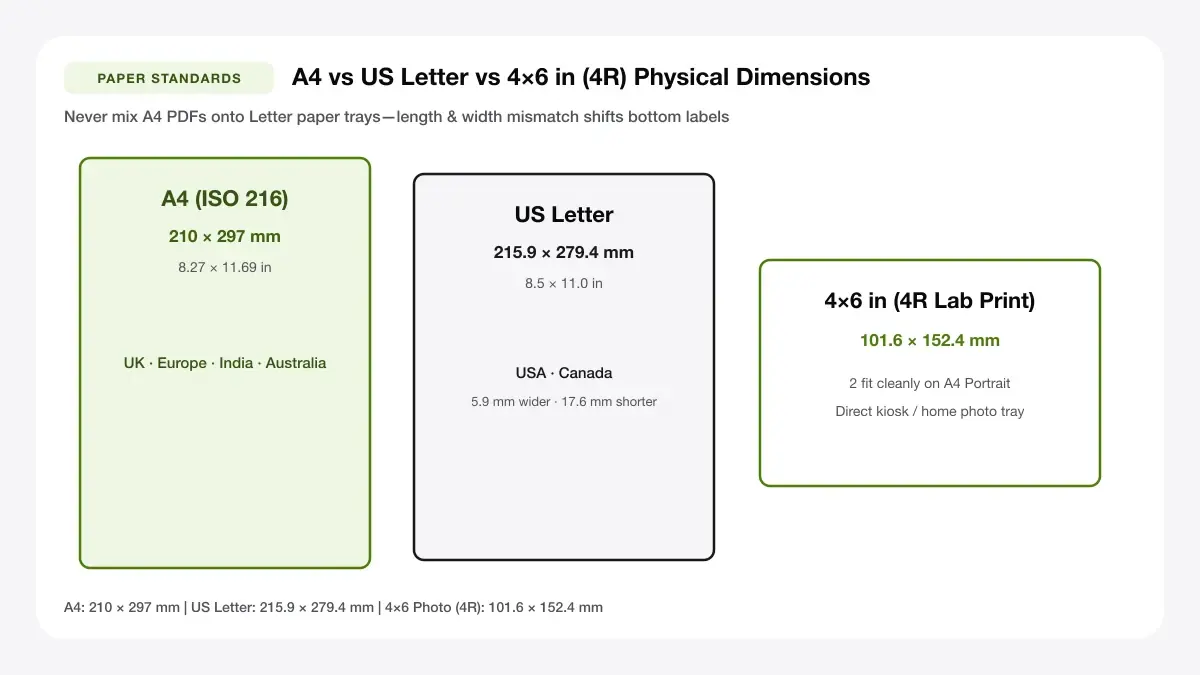
Outside North America, ISO A4 is universal for both copy paper and inkjet photo packs; North American stationery aisles stock US Letter instead.
Letter is 216 x 279 mm
US Letter (8.5 × 11 in) is 6 mm wider yet 18 mm shorter than A4 (210 × 297 mm). Downloading an a4 paper size photo template and printing onto US Letter clips the bottom 18 mm unless paper settings match.
Photo size in A4 paper: how many standard prints fit
Rather than dedicating an entire costly sheet to one snapshot, planning photo size in a4 paper lets you slice multiple standard keepsakes cleanly from a single 210 × 297 mm page.
| Standard Print Size | Dimensions (mm / in) | Fits Per A4 Sheet | Waste / Margin Notes |
|---|---|---|---|
| 4×6 in (4R) | 102 × 152 mm | 2 prints (Landscape A4) | Leaves slim ~6 mm border on A4 edges |
| 5×7 in (5R) | 127 × 178 mm | 2 prints (tight margin) | Needs borderless or 125 × 175 mm slight trim |
| Wallet (2.5×3.5 in) | 63.5 × 88.9 mm | 9 prints (3 × 3 grid) | Clean fit inside standard 5 mm printer margins |
| Square 90×90 mm | 90 × 90 mm | 6 prints (2 × 3 grid) | Easy grid for social-media printouts |
| Passport (UK/EU/AU) | 35 × 45 mm | 16–20 prints | Plenty of white cut gutters for straight scissors |
4x6 and 5x7 photos on A4
Two 4×6 in (102 × 152 mm) snapshots pack comfortably side by side on landscape A4 (297 mm wide easily holds 102 + 102 = 204 mm?Wait: rotated so each 152 mm height sits along 210 mm height, two 102 mm widths = 204 mm inside 297 mm width—actually 204 mm wide leaves massive margin, or stacked vertically inside portrait A4: 2 × 152 mm = 304 mm doesn't fit!). Always orient two 4×6s vertically side-by-side along landscape 297 mm width (102 × 2 = 204 mm width, 152 mm height <= 210 mm)!
Passport and wallet photos on A4
Packing 9 wallet keepsakes or 16–20 ID shots onto one a4 size photo sheet drops per-photo printing expense down to fractions of a penny.
35x45 mm passport size
Official UK, EU, Australian, and Indian passport rules stipulate 35 × 45 mm framing (US uses 2 × 2 in / 51 × 51 mm). Always confirm head-height rules with your local passport authority before mailing home-cut copies.
Square and panoramic photos on A4
Six 90 × 90 mm square frames fit effortlessly in a 2×3 portrait A4 grid without uneven leftovers.
— FASTER BROWSER ALTERNATIVE —
Skip Manual Setup — Use Our Free Arrange Photos for Printing
Instead of wrestling with printer driver scaling or manual table margins, generate a locked 100%-scale PDF directly in your browser using our arrange photos for printing tool.
Image size A4 paper: what resolution do you need?
Picking the right image size a4 paper starts with comparing camera sensor aspect ratio against ISO A-series sheet geometry so faces aren't chopped.
Minimum pixel size for a sharp A4 photo
While 2,480 × 3,508 px delivers strict 300 DPI for full prints a4 size work, everyday portraits down to 1,800 × 2,500 px (~215 DPI) still render remarkably clean at arm's length on semi-gloss paper.
Resizing and cropping a photo to A4
An a4 sheet size image ratio differs slightly from most DSLR (3:2) and smartphone (4:3) captures, meaning borderless edge-to-edge fills crop narrow strips along either the long or short side.
Aspect ratio 1:1.414
ISO A4 holds a mathematical 1:√2 (1:1.414) ratio—meaning a 4:3 (1:1.333) phone photo loses ~5% off the top/bottom when cropped to A4, while a 3:2 (1:1.5) camera shot trims ~6% off the left/right edges.
Cost of A4 size photo print and print options
Evaluating the true a4 size photo print cost / cost of a4 size photo print helps balance DIY home convenience against commercial kiosks.
Print at home
Home refillable ink-tank printers (Epson EcoTank / Canon MegaTank) cut ink costs dramatically compared to tiny 5 ml cartridge models, making multi-photo A4 sheets far cheaper than high-street booths.
Paper and ink cost per sheet
Decent 200–250 gsm resin-coated A4 photo paper typically costs $0.20–$0.45 per sheet in bulk packs; tank ink adds roughly $0.05–$0.15 per full-colour page, while small cartridge printers run $0.60–$1.20+ in ink alone.
Print at a photo lab or kiosk
Lab kiosks charge roughly $1.50–$4.00 per single A4 sheet, making them ideal if you only print two posters a year—especially when exporting multi-up a4 size paper photo PDF sheets via Print Sheet Maker first so one A4 lab print returns 4 or 9 finished snapshots.
Tools that place photos on A4 sheets automatically
Stop calculating pixel gutters manually—browser sheet builders map exact A4 dimensions into drag-and-drop grids immediately.
A4 photo sheet maker
Tile 2, 4, 6, 9, or 16 crisp frames across portrait or landscape A4 PDFs with toggleable crop marks.
A4 collage maker
Arrange family keepsakes, holiday grids, and memory boards in matching A4 layouts with balanced clean borders.
Frequently asked questions
Essential answers on photos a4 size pixel targets, orientation, and cost savings.
What size is an A4 photo in pixels?
For standard 300 DPI photo printing, a full A4 image measures 2,480 × 3,508 pixels (portrait) or 3,508 × 2,480 pixels (landscape). For 150 DPI plain-paper drafts, 1,240 × 1,754 px works cleanly.
What is the best photo size for A4 paper?
Packing either two 4×6 in (4R) prints or four quarter-page prints on a single A4 page balances visual impact, zero aspect-ratio distortion, and paper savings best.
Is A4 photo printing expensive?
Printing single huge photos a4 size on tiny ink cartridges gets costly, but switching to tank ink plus packing 4 to 9 prints per a4 paper image size sheet reduces unit cost to pennies per photo.
— PUT THIS WORKFLOW INTO ACTION —
Build Your Sheet with Arrange Photos for Printing
Generate a print-ready PDF with exact margins, custom gutters, and hairline crop marks right now—completely free and with no sign-up.