Custom A4 Sticker Sheet Grid with Die-Cut Outline
Arrange custom sticker designs across A4 vinyl or matte sticker paper with crisp outlines ready for scissors, trimmers, or Cricut.
How to use the sticker sheet maker in 4 steps
Turn single PNG/JPG illustrations or clean typography badges into full A4 sticker sheets ready for scissors, craft trimmers, or kiss-cut blade plotters.
Step 1: Choose a sticker size and shape
Pick a compact planner grid, an 8 sticker a4 template style layout, or a single giant bumper/laptop layout.
Step 2: Upload or create your artwork
Upload transparent PNG illustrations or clean badge text, then toggle subtle outer cut borders if you plan to trim stickers by hand.
Rectangles, circles and custom shapes
Keep rectangular borders tight for quick paper-trimmer passes, or switch to circular frames for badge seals and round packaging stickers.
Cut lines for kiss-cut and hand cutting
Enable light dashed guides when trimming by hand with scissors or a craft knife, or disable borders when printing artwork onto pre-scored kiss-cut vinyl.
Step 3: Arrange stickers across the A4 sheet
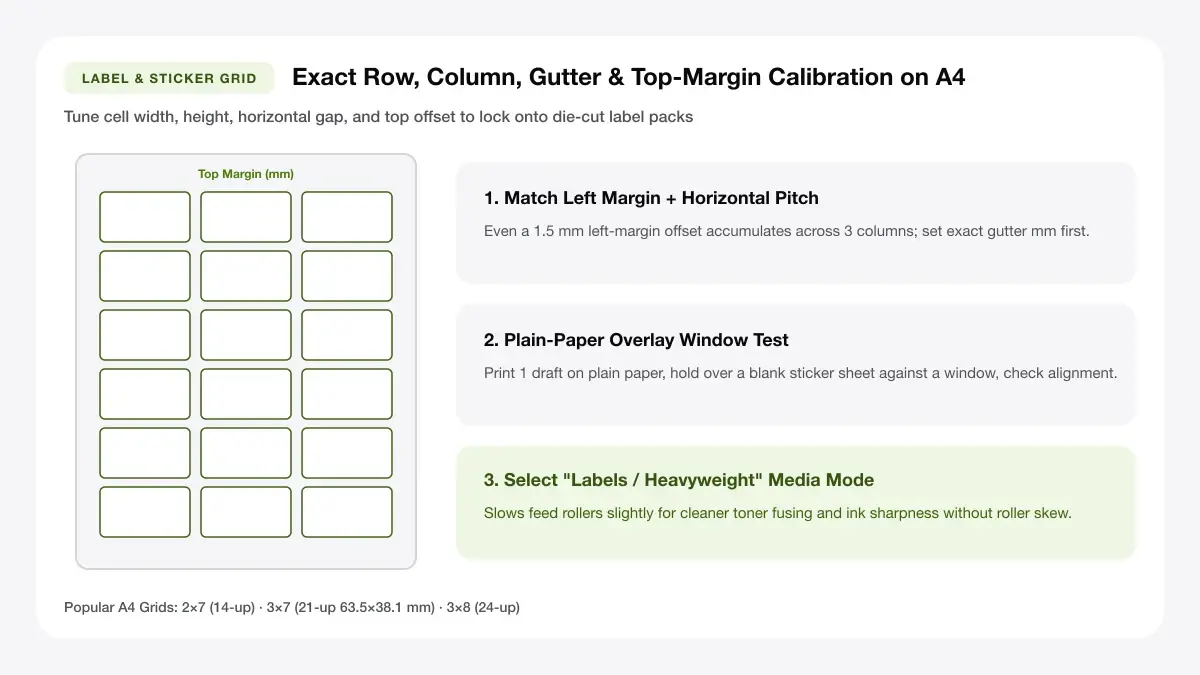
Preview every row on the live A4 sticker paper format grid and tune gap spacing so blades or scissors never nick neighbouring art.
Step 4: Download the PDF and print
Export a high-clarity PDF and print onto matte, glossy, or waterproof vinyl sticker sheets at 100% scale.
Sticker sheet maker online: layouts and presets
Each sticker sheet maker online preset handles spacing, margin safety, and density so you fit maximum stickers per sheet.
Small stickers (grid sheet)
Pack 24, 36, or 48 mini icons across one sheet—ideal for habit trackers, calendar dates, teacher rewards, and craft fair sampler sheets.
Many small stickers per sheet
Full-sheet sticker layout matrices maximize usable A4 printable area for planner icons, laptop decals, and product logo packs.
Best for planners and journals
Keep clean cut outlines separated by at least 4–6 mm if hand-trimming with scissors or running straight-line paper trimmers.
Mixed-size sticker sheet
Pair hero brand logos with smaller thank-you seals and batch stickers on an 8 sticker a4 template or 12-up layout.
Large and small stickers together
Full-sheet sticker layout matrices maximize usable A4 printable area for planner icons, laptop decals, and product logo packs.
Best for product and gift sheets
Keep clean cut outlines separated by at least 4–6 mm if hand-trimming with scissors or running straight-line paper trimmers.
Single large sticker per page
Fill nearly the entire printable area of A4 sticker paper with a single bold decal for storage bins, toolboxes, or window signage.
One big sticker on A4
Full-sheet sticker layout matrices maximize usable A4 printable area for planner icons, laptop decals, and product logo packs.
Best for laptop and wall stickers
Keep clean cut outlines separated by at least 4–6 mm if hand-trimming with scissors or running straight-line paper trimmers.
— FREE INTERACTIVE SHEET GENERATOR —
Build & Download Your Sticker Sheet Maker Online PDF
Configure paper size, margins, gutters, and crop marks in real time using the sticker sheet maker online workspace above—no account or watermark.
A4 sticker paper template: paper size and print settings
Following exact tray and scaling rules for your A4 sticker paper template avoids ink smudging and clipped outer edges.
Page size and orientation
Select heavy glossy photo or specialty sticker setting on ISO A4 so rollers grip coated waterproof vinyl backing without slipping.
Using A4 or Letter
Verify whether your adhesive vinyl or paper is cut to A4 size sticker paper format (210 × 297 mm) or US Letter (8.5 × 11 in) before choosing the sheet preset.
Scale, margins and bleed
Scaling distortion alters custom craft sizes and shifts registration marks expected by hobby cutting mats.
Print at 100% or Actual Size
Print at 100% Actual Size with photo-quality media settings selected so saturated inks cure cleanly onto coated A4 sticker vinyl.
Keep a safe margin
Keep bright artwork logos 3 mm away from kiss-cut guide paths so blade bevels never expose unintended white paper slivers.
Printable sticker sheet maker: recommended settings
People searching for an A4 size sticker paper format in Word or an A4 size sticker paper format in Excel often run into shifted table margins; our printable sticker sheet maker solves that directly in vector PDF. Choose 'Photo Paper' or 'Glossy/Matte Vinyl' in your printer driver at high quality.
Print quality and file format
Mixed vector outlines and 300 DPI artwork ensure vibrant sticker sheet colors alongside silky smooth trim paths.
PDF versus JPG output
Browser PDF export bundles multiple stickers per A4 sheet losslessly so small badge lettering and sharp borders survive printing.
A4 sticker sheet template for everyday projects
A dependable A4 sticker sheet template turns any colour inkjet printer into an on-demand sticker studio.
Planner and journal stickers
Print dated week headers, pastel habit flags, and decorative stickers on matte writeable sticker paper.
Branding stickers for small shops
Add custom thank-you seals and logo badges to bakery boxes, candle mailers, and apparel tissue folds—cheaper than ordering bulky rolls for new SKUs.
Party favour and classroom stickers
Create themed birthday bag seals, name tags, and gold-star alternatives in minutes using any uploaded illustration.
Tips for cleaner, sharper prints
Looking to match a specific pre-cut metric sheet pack or paper GSM? Check our guide to
Allow freshly printed glossy inkjet sticker sheets 15 minutes to air-cure before rubbing, laminating, or cutting apart.
Leave 2 mm between stickers for cutting
A 2 to 3 mm gap gives scissors, guillotine blades, and cutting mats breathing room so trimming one row never slices into the next.
Use waterproof vinyl for outdoor stickers
Standard uncoated paper tears when wet; choose printable vinyl sticker sheets plus a clear self-adhesive laminate film for water bottles and laptops.
Add a thin cut line in a separate layer
Toggle subtle light-grey cut guides on blank full-sheet vinyl so you always know exactly where each sticker boundary sits before cutting.
Frequently asked questions
Common questions on A4 printable vinyl, cold lamination overlays, scissors vs cutter blades, and bleed margins.
How do I make a sticker sheet online?
Open this printable sticker sheet maker, upload your sticker image or create text labels, pick an A4 label sticker paper A4 template grid, and export a 100%-scale print-ready PDF.
What size is an A4 sticker sheet?
An A4 sticker sheet measures 210 × 297 mm (2,480 × 3,508 px at 300 DPI). Leave at least a 5 mm hardware margin on every side unless your printer specifically supports borderless thick media.
Can I print stickers on a normal printer?
Yes. Most home inkjet printers handle matte, glossy, and inkjet printable vinyl sticker sheets cleanly when loaded one sheet at a time via the rear feed.
Do I need a cutting machine?
No. While our sheets work great alongside craft cutters, you can enable subtle dashed cut borders and slice straight grids with scissors or a sliding paper trimmer.
— EXPLORE MORE —
More print sheet tools and guides
Try circular badge grids, event name tags, or compare A4 glossy vs matte sticker papers.
Sticker paper size A4
Compare matte, glossy, clear, and vinyl A4 sticker sheet finishes and printer compatibility.
How to print multiple stickers on one page
Step-by-step tutorial covering paper feed direction, drying time, and clean cutting.
Cricut printable sticker paper
Tips for choosing A4 vinyl stocks and laminating sheets before Plotter Print Then Cut.
DIY vs print service sticker sheets
Calculate break-even costs comparing home inkjet sheets vs ordered sticker packs.
Where to buy A4 sticker paper
Browse recommended retail packs across Officeworks, Avery, and online suppliers.
Round labels for printer
Tile exact circular diameters across A4 or Letter sheets for jar caps and seals.
— PRINT-READY IN UNDER A MINUTE —
Ready to Print Your Sticker Sheet Maker Online?
Jump back to the live canvas workspace above to customize your layout and download a locked-scale PDF, or explore companion tools.