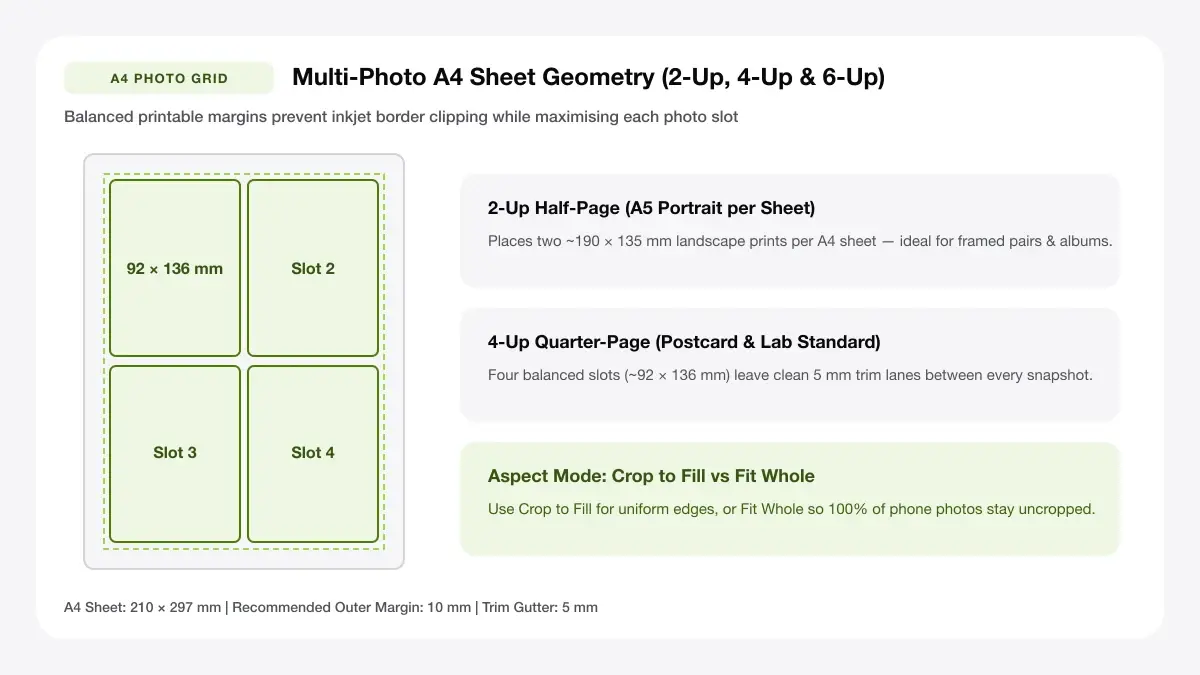
Full-Bleed & Bordered A4 (210 x 297 mm) Collage Grid
Build crisp, frame-ready A4 photo collages on 210x297 mm paper with adjustable white frame padding and zero compression artifacts.
How to use the A4 collage maker in 4 steps
Arrange 4, 6, 9, or 12 memories into an economical full-size A4 (210 × 297 mm) collage ready for desk or wall framing.
Step 1: Add your photos
Batch-load up to 12 photos straight from laptop folders or phones—process stays entirely offline inside your tab.
Step 2: Choose an A4 collage layout
Choose symmetric 2×2, 3×2, 3×3, or 4×3 A4 grids with optional clean gallery borders around every tile.
Portrait or landscape A4
Portrait A4 suits classic multi-row scrapbooks and year-in-review posters, while Landscape A4 creates cinema-like grids.
Spacing, borders and rounded corners
Add 6–10 mm crisp gallery white spacing between tiles so each individual memory stands out distinctly inside large frames.
Step 3: Rearrange, crop and set spacing
Use Cycle & Fit controls carefully per tile so panoramic groups fit comfortably alongside close-up portraits.
Step 4: Download the A4 PDF or JPG
Export exact 210 × 297 mm A4 PDF at crisp print quality—zero login or corner watermarks attached.
A4 collage maker: layouts and presets
Large-canvas A4 collage layouts calculate mathematical border spacing across full 2480 × 3508 px print resolution.
Grid collage
Arranges six photos cleanly in a 2×3 A4 photo collage template with balanced spacing.
Equal frames in rows and columns
Best for neat albums and school projects
Freeform collage
Combines one wide banner image on top with four balanced smaller frames below for dynamic storytelling.
Mixed frame sizes in one layout
Best for scrapbooks and posters
Photo-and-text collage
Includes a clean bottom title line under a 2×2 photo grid for family dates, class names, or trip titles.
Frames plus a title area
— FREE INTERACTIVE SHEET GENERATOR —
Build & Download Your A4 Collage Maker PDF
Configure paper size, margins, gutters, and crop marks in real time using the a4 collage maker workspace above—no account or watermark.
A4 size collage maker: paper size and print settings
Full-page A4 collages fill home trays completely—set crisp matte or glossy paper profiles so colors match screen brightness.
Page size and orientation
Using A4 (210 x 297 mm)
Confirm standard ISO A4 paper selection (not US Letter) so balanced 10 mm top/bottom gallery margins stay equal.
Scale, margins and bleed
Print at 100% or Actual Size
Disable browser Fit-to-Page shrinkage so your finished A4 collage fills standard 21 × 29.7 cm IKEA and craft frames cleanly.
Keep a safe margin
Reserve 10–12 mm outer page breathing space so plastic frame rabbet lips never hide outer tile corners.
Create A4 collage: recommended settings
For framed A4 wall prints, keep a 10 mm outer margin so the frame mat never hides the outer edges of your photos, and set spacing to 4–6 mm.
Print quality and file format
PDF versus JPG output
Full-page A4 PDF preserves fine facial sharpness across 9 to 12 sub-images simultaneously at 300 DPI quality.
Collage maker A4 size for everyday projects
A4 collages give birthdays, travel milestones, and classroom boards impressive wall presence at a fraction of lab canvas prices.
School posters and projects
Full-sheet A4 compositing makes school posters and projects frame-ready directly off an ordinary home color inkjet.
Wall displays and notice boards
Full-sheet A4 compositing makes wall displays and notice boards frame-ready directly off an ordinary home color inkjet.
Gift pages and greeting cards
Full-sheet A4 compositing makes gift pages and greeting cards frame-ready directly off an ordinary home color inkjet.
Tips for cleaner, sharper prints
Simple composition and paper weight advice so home-printed A4 collages never curl inside wall frames.
Use consistent photo orientation within a row
Ensuring you "use consistent photo orientation within a row" stops dark ink coverage from warping lightweight office paper on multi-photo A4 collages.
Keep 5 mm spacing for a cleaner grid
Ensuring you "keep 5 mm spacing for a cleaner grid" stops dark ink coverage from warping lightweight office paper on multi-photo A4 collages.
Export as PDF for exact A4 sizing
Ensuring you "export as pdf for exact a4 sizing" stops dark ink coverage from warping lightweight office paper on multi-photo A4 collages.
Frequently asked questions
Is there a free A4 collage maker online?
Yes. You can use this a4 collage maker online completely free in any modern browser with no account or watermark.
How do I create an A4 collage?
Upload 4 to 6 photos, pick Grid, Mixed Frame, or Photo + Title above, type an optional caption, and click Download Print-Ready PDF.
What resolution do I need for an A4 collage?
An A4 page at 300 DPI is 2480 × 3508 pixels overall, so standard 1200+ pixel phone photos look crisp inside multi-photo A4 collage frames.
Can I make an A4 size collage on my phone?
Yes. Open this page in your mobile browser, upload photos straight from your camera roll, and save the A4 PDF to print wirelessly.
— EXPLORE MORE —
More print sheet tools and guides
arrange photos for printing
Need 8, 9, or 10 plain photos on an A4 sheet? Use the photo sheet maker.
4x6 collage maker
Design smaller 4×6 inch collages for photo-lab printing.
print big picture on multiple pages
Split one big collage or image into a multi-page wall poster.
how to print a big picture on multiple pages
Learn tile overlap and DPI limits when scaling wall collages past A4.
photoshop print multiple images on one page
Follow our Adobe Photoshop & Lightroom grid export tutorial.
— PRINT-READY IN UNDER A MINUTE —
Ready to Print Your A4 Collage Maker?
Jump back to the live canvas workspace above to customize your layout and download a locked-scale PDF, or explore companion tools.