Borderless Off & 100% Scale Lock for Biometric Compliance
Disable printer Fit-to-Page shrinkage so every home-printed passport photo measures within exact government millimeter tolerances.
What you need before you start
Verify government biometrics lighting rules before laying multiple duplicates across a single sheet.
Check local official passport & visa rules before submitting
Print Sheet Maker strictly helps arrange correctly sized photos onto printable sheets—it does NOT verify biometric rules. Always check your country's official passport authority guidelines for required dimensions, head-height ratios, paper finish (matte vs glossy limits), and background colour rules before mailing.
A compliant passport photo
Shoot against a plain off-white or cream wall in soft natural window lighting (zero harsh face shadows), neutral mouth-closed expression, no tinted glasses, and proper head-to-frame proportions matching your passport authority.
Photo paper in A4 or 4x6
Use high-grade matte or smooth glossy/satin resin-coated inkjet photo paper (200–260 gsm)—plain 80 gsm office paper fails government sharpness and ink-longevity standards.
Step-by-step: print using A4 or 4x6 passport sheets
Complete these exact formatting and calibration checks so print multiple passport size photos on one page outputs hold official millimetre tolerance cleanly.
Step 1: Check your country's photo rules
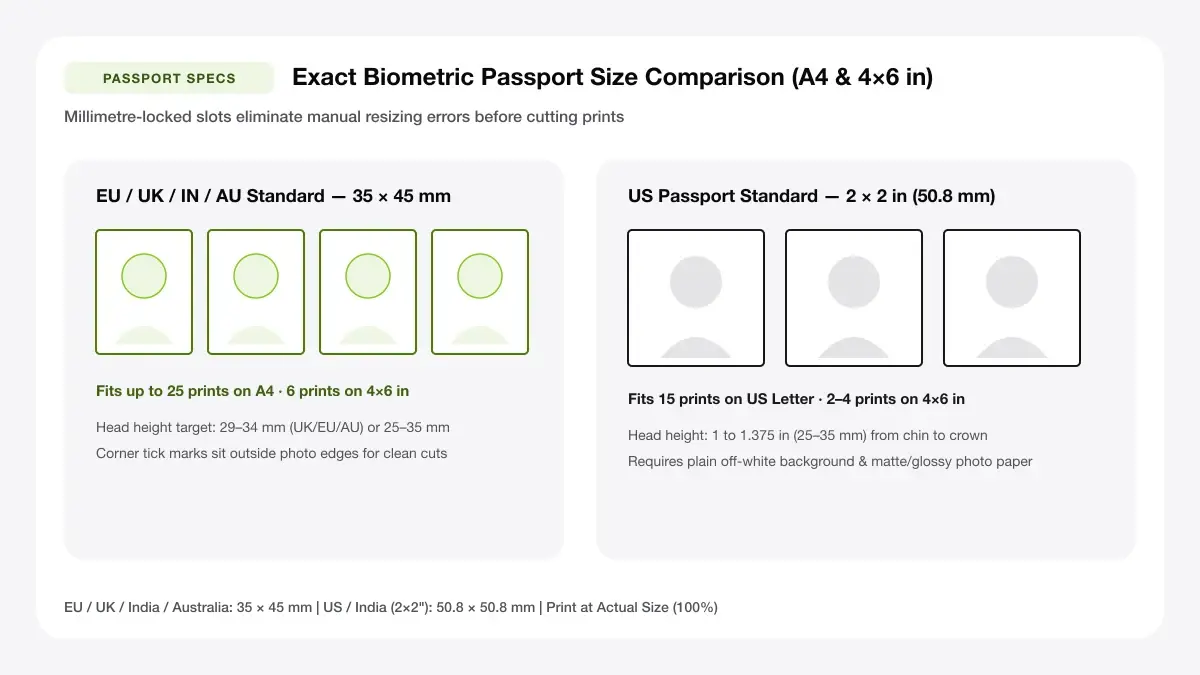
Every issuing authority publishes strict head-height, eye-level band, and background contrast targets (for example UK/EU/AU 35 × 45 mm typically asks for a 29–34 mm chin-to-crown face size).
Step 2: Crop to the exact size
Verify image framing matches your exact regional aspect ratio so heads neither squeeze horizontally nor crop ears.
35x45 mm layout
Standard across the UK, EU, Schengen visas, Australia, New Zealand, and Canada (varies cleanly by doc—always check local official specs!): leaves clean room for 6 prints on 4×6 or 16+ on A4.
2x2 inch layout
US Passport & Green Card standard (51 × 51 mm): neatly fits up to 6 prints across a 4×6 postcard sheet (3×2 grid) or 12+ on A4/Letter.
Step 3: Place photos in a grid
Maintain a tidy 3–5 mm white gap between passport boxes with crisp hairline corner trim marks so cutting never slices across white border checks or clothing edges.
Step 4: Print at 100% scale
Open your sheet PDF and confirm Scale = 100% / Actual Size (Borderless OFF!) before pressing Print—even a tiny 4% printer shrink turns a 35 mm portrait into a rejected 33.6 mm cut.
Print multiple passport size photos on one page
When producing print multiple passport size photos on one page sets for school IDs or family travel renewals, double-check physical width with a metric ruler on sheet 1.
Photo lab alternative
No photo printer at home? Export a 4×6 in (102 × 152 mm) 300 DPI multi-passport sheet, carry the file on USB to any retail 4×6 photo kiosk, and pay pennies for one standard 4×6 chemical lab print.
Step 5: Cut along the guides
Use a sliding rotary trimmer or sharp craft blade alongside a steel straightedge—freehand office scissors often leave wavy uneven edges rejected by passport scanners.
— FASTER BROWSER ALTERNATIVE —
Skip Manual Setup — Use Our Free Passport Photo Sheet Maker
Instead of wrestling with printer driver scaling or manual table margins, generate a locked 100%-scale PDF directly in your browser using our passport photo sheet maker tool.
Common problems and quick fixes
Government offices reject ID sheets aggressively on minor scaling or exposure flaws—check all three before submitting applications.
Photos are not the right size
Measure finished cut boxes carefully with a millimetre ruler! If slightly tiny, 'Fit to Printable Area' or Borderless expansion was active in your print driver. Re-export PDF and lock Actual Size 100%.
Face is cropped too tightly
Ensure shoulders and full hair crown remain generously visible inside the original portrait photo BEFORE selecting passport tile ratios so automatic Cover crops don't slice hair tops.
Prints look washed out
Verify driver Media Type matches Glossy/Semi-Gloss Photo Paper rather than Plain Paper, and run printer nozzle-check cleaning if magenta/cyan tints shift skin tones unnaturally.
Faster option: let a layout tool do the work
Stop pasting passport squares inside flaky word-processor margins—lock millimetre-accurate grid PDFs automatically.
When a sheet maker saves time
Our passport layout templates fix exact 35 × 45 mm or 2 × 2 inch frames onto A4 or 4×6 canvases at 100% true print coordinates in seconds.
Passport photo sheet maker
Generate an aligned 35 × 45 mm or 2 × 2 in passport photo grid on A4 (or switch to 4×6 kiosk templates) directly in your browser.
Frequently asked questions
Common scaling, paper tray, and export troubleshooting questions for step-by-step: print using a4 or 4x6 passport sheets before printing a final sheet.
How to print multiple passport size photos on one page?
For reliable how to print multiple passport size photos on one page output, upload your compliant photo into Print Sheet Maker's Passport Photo Sheet Maker (A4) or 4×6 template, lock 35 × 45 mm or 2 × 2 in sizing, export at 100% PDF, and cut neatly along guides.
How many passport photos fit on A4?
A portrait A4 page comfortably accommodates 12 to 20 standard 35 × 45 mm prints (with easy cutting gutters) or 12 classic 2 × 2 inch US passport portraits.
Can I use a photo lab instead of printing at home?
Yes—build a 6-up 4×6 passport sheet template first, save it as a crisp high-res JPEG/PDF, and order one cheap standard 4×6 print at any local store photo counter.
— PUT THIS WORKFLOW INTO ACTION —
Build Your Sheet with Passport Photo Sheet Maker
Generate a print-ready PDF with exact margins, custom gutters, and hairline crop marks right now—completely free and with no sign-up.