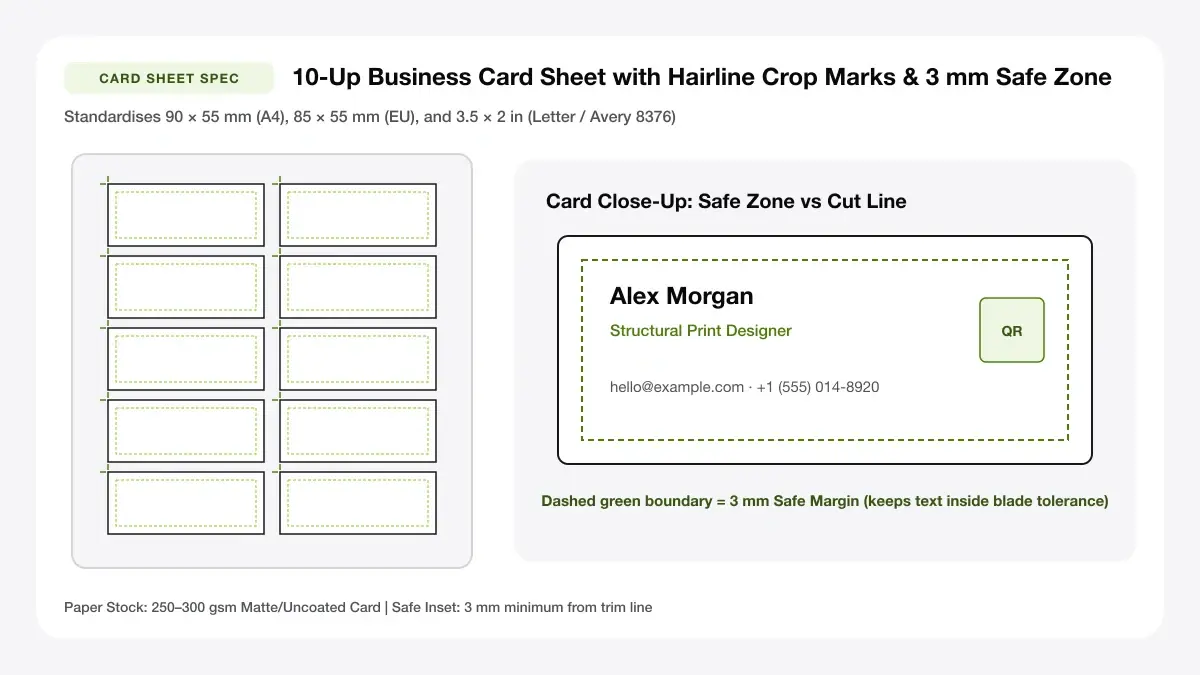
US 3.5x2 in vs EU 85x55 mm vs JP 91x55 mm Bleed & Safe Zones
Apply industry-standard 3 mm bleed and 3 mm inner safe margins so home cuts and commercial runs never slice logos or phone digits.
Standard business card size by region
Match your standard business card format to the pockets, cardholders, and stationery boxes common where you meet clients.
| Region | Finished Trim Size | With 3 mm Bleed | Common Sheet Grid |
|---|---|---|---|
| US & Canada | 3.5 × 2 in (88.9 × 50.8 mm) | 3.75 × 2.25 in (95 × 57 mm) | 10-up on US Letter (2 × 5) |
| UK & Western Europe | 85 × 55 mm (3.35 × 2.17 in) | 91 × 61 mm | 10-up on A4 (2 × 5) |
| Australia & New Zealand | 90 × 55 mm (3.54 × 2.17 in) | 96 × 61 mm | 10-up on A4 (2 × 5) |
| Japan | 91 × 55 mm (Meishi) | 97 × 61 mm | 10-up on A4 (2 × 5) |
| China / Hong Kong / Singapore | 90 × 54 mm | 96 × 60 mm | 10-up on A4 (2 × 5) |
US and Canada: 3.5 x 2 inches
North American business cards format packs, rotary Rolodex files, and pre-perforated Avery sheets all standardise strictly on 3.5 × 2 inches so ten cards pack cleanly into a 2×5 grid on US Letter paper.
Metric equivalent: 89 x 51 mm
Converted to metric for digital layouts, 3.5 × 2 in equals 88.9 × 50.8 mm (rounded cleanly to 89 × 51 mm in international CAD programs).
Europe, UK and Australia: common metric sizes
ISO ID-1 credit-card proportions inspire 85 × 55 mm across the UK and EU, whereas Australia and New Zealand favour a slightly wider 90 × 55 mm cut—both drop comfortably 10-up onto ISO A4 cardstock.
Asia: common name card sizes
Japanese meishi cards measure 91 × 55 mm and East Asian visiting cards commonly run 90 × 54 mm—fitting easily inside standard 10-up A4 sheets with generous trim gutters.
Business card dimensions template: bleed, trim and safe zone
Every clean business card dimensions template divides artwork into three invisible concentric frames: outer bleed edge, physical trim line, and inner safe text zone.
Bleed: 3 mm beyond the trim
Whenever your card features a dark background, full-bleed photo, or coloured side strip, extend colour 3 mm (0.125 in) past the trim edge on every side. Guillotine blades shift ±0.5–1 mm during stacking—bleed ensures zero hairline white slivers remain along cut borders.
Safe zone for text and logos
Place all text, logos, QR codes, and borders well inside the physical card edge.
3 mm inside the trim
Keeping every readable glyph at least 3 mm (preferably 4–5 mm) inside the cut trim protects names and phone digits from minor feeder tilt on home inkjet printers or commercial presses alike.
Resolution and colour mode
Export typography as live vector PDF rather than flattened JPEGs whenever possible so small 7.5 pt contact lines never fuzz.
300 DPI and CMYK vs RGB
Keep embedded photos at 300 DPI minimum (1,050 × 600 px minimum at trim, 1,125 × 675 px with bleed). Offset presses expect CMYK colour separation, while desktop RGB inkjet drivers convert bright sRGB files automatically.
— FASTER BROWSER ALTERNATIVE —
Skip Manual Setup — Use Our Free Business Card Template
Instead of wrestling with printer driver scaling or manual table margins, generate a locked 100%-scale PDF directly in your browser using our business card template tool.
Business card size template for design software
Different apps handle multi-up sheets differently—pick a business card size template setup matching the software you actually own.
Photoshop and Illustrator
Designers building a business card size illustrator template or business card size template psd file set a single-card artboard (with 3 mm bleed) in Vector Illustrator or 300 DPI Photoshop, then drop the exported PDF into a 10-up imposition sheet—or upload directly into our browser multi-card sheet generator.
Word and Google Docs
Word relies on fixed 2×5 table grids matching Avery paper codes; turning off table auto-resize prevents cell height creep when bold fonts wrap onto two lines.
Canva and online makers
Canva exports crisp single cards cleanly, yet its free multi-up printing defaults expect paid print orders—upload your single exported card PNG/PDF into our 10-up Card Sheet Maker to tile ten on A4 or Letter free.
Typical business card layout: what goes where
A typical business card layout earns second glances through calm whitespace rather than stuffing seven social handles into 85 × 55 mm.
Front: logo, name and role
Reserve the front face for primary brand identity (clean mark + company name), person's name at 11–14 pt, short role title at 8.5–9.5 pt, and the two quickest contact paths (phone + email or website).
Back: QR code, address or tagline
Offload website links, booking pages, maps, or appointment reminder lines onto the back face.
Keep the back uncluttered
Print QR codes at least 18–22 mm square with pure black modules on white or light pastel cardstock so dim pub or conference lighting scans smoothly.
Standard business card template files to download
Skip broken ZIP archives of outdated software files—generate clean standard business card template PDFs tailored to your paper tray right in the browser.
Blank business card template
Export crisp empty crop-marked 10-up sheets to hand-stamp or hand-calligraph artisanal craft cards.
A4 and Letter card sheets
Always lock your business cards format sheet grid to the exact cardstock pack loaded (85×55 mm / 90×55 mm on A4; 3.5×2 in on Letter).
Frequently asked questions
Quick checks on standard business card format specs before exporting your print sheet.
What is the standard business card size?
In the US and Canada, 3.5 × 2 inches (89 × 51 mm) is standard; in the UK and Western Europe it is 85 × 55 mm; in Australia and New Zealand it is 90 × 55 mm.
What is a standard business card format for printing?
The safest standard business card format for home or commercial printing is a 300 DPI vector PDF set to exact regional trim size (with 3 mm bleed for full-colour edges and 3 mm inner safe margins for text).
Should I add bleed to my business card file?
Yes whenever colour, borders, or photos touch any edge of the finished card; leave clean white cards without bleed if printing onto plain white un-trimmed borders or perforated 10-up packs.
— PUT THIS WORKFLOW INTO ACTION —
Build Your Sheet with Business Card Template
Generate a print-ready PDF with exact margins, custom gutters, and hairline crop marks right now—completely free and with no sign-up.