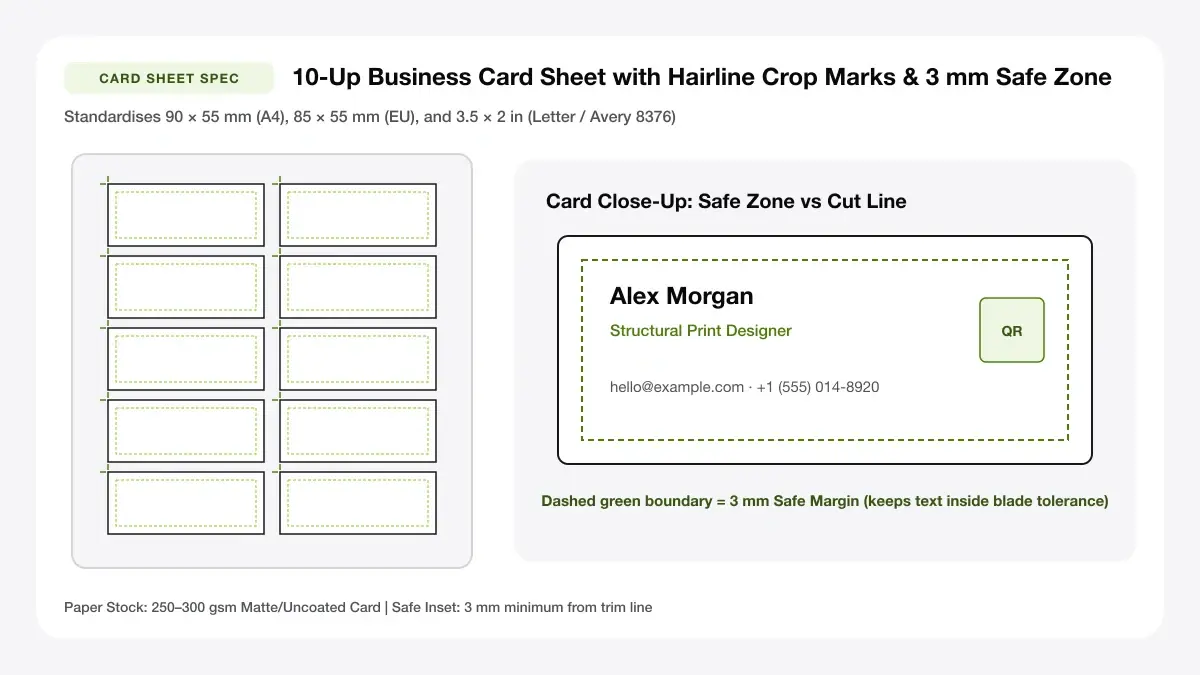
Print 10 Business Cards on One A4 or Letter Sheet
Pack 10 professional business cards per page with crisp corner crop lines and zero image compression for straight-edge guillotine cuts.
How to use the business card sheet maker in 4 steps
Turn any single exported PNG/JPG card graphic—or live form text—into a cropped 8-up or 10-up sheet in under a minute.
Step 1: Upload your card design
Drop an existing 3.5 × 2 inch card artwork exported from Canva/Figma, or stay in Edit Mode to compose crisp text cards.
Step 2: Choose 8 or 10 cards per sheet
Choose 10-up A4 (90 × 55 mm / 85 × 55 mm) or 10-up US Letter (3.5 × 2 in) depending on your printer tray and guillotine.
8-up and 10-up layouts
Each grid option locks uniform horizontal and vertical card cells mathematically across A4 or Letter margins.
Crop marks and bleed settings
Keep crisp hairline corner crop marks active for plain heavy cardstock, leaving gutters clean across perforated faces.
Step 3: Add crop marks and bleed
Verify font size legibility on the zoom preview, then enable mirrored Page 2 if adding website links or services on backs.
Step 4: Download the A4 or Letter PDF
Download crisp 10-up vector PDF and print one alignment check on plain 80 gsm sheet before loading heavy 280 gsm card stock.
Print multiple business cards on one page: layouts and presets
Choose between classic 10-up tight efficiency or generous 8-up trim-gutter layouts across international paper standards.
10 cards per A4 sheet
Fits 10 cards (90 × 55 mm) neatly onto A4 paper—ideal when searching for an a4 business card template word or a4 business card template psd 10 per sheet alternative.
Standard 2 x 5 grid
Best for most home and office printers
8 cards per Letter sheet
Leaves wider gaps between US 3.5 × 2 inch cards for easier hand cutting with a rotary trimmer or business card cut out template.
Standard US 2 x 4 layout
Best for US card stock
Full-page card sheet
Adds corner crop marks outside every card slot so your business card cutting template produces square, repeatable corners.
Edge-to-edge sheet with cut guides
Best for guillotine and craft cutters
— FREE INTERACTIVE SHEET GENERATOR —
Build & Download Your Print Multiple Business Cards on One Page PDF
Configure paper size, margins, gutters, and crop marks in real time using the print multiple business cards on one page workspace above—no account or watermark.
Business card sheet template: paper size and print settings
Card imposition fails mostly through quiet PDF shrinkage—lock these exact driver tolerances before cutting stacks.
Page size and orientation
Using A4 or Letter
Match A4 (210 × 297 mm) or US Letter (8.5 × 11 in) inside both the sheet generator and OS tray preferences.
Scale, margins and bleed
Print at 100% or Actual Size
Always force Actual Size (100%) scaling so 88.9 × 50.8 mm US cards never shrink to awkward non-wallet rectangles.
Keep a safe margin
Keep company names, phone digits, and social handles 3 mm away from crop corners so rotary blades never graze lettering.
Print multiple business cards on one sheet: recommended settings
Select Heavy Card / Matte Cardstock in your printer driver, set Print Scale to 100%, and keep Crop marks enabled when cutting plain A4 card stock.
Print quality and file format
PDF versus JPG output
Native vector PDF ensures tiny 7 pt email addresses and micro QR squares print dark and razor crisp on cardstock.
Business card page template for everyday projects
In-house 10-up sheets let startups, contractors, and side hustles test new pitches overnight without waiting on commercial printers.
Short runs for events and trade shows
Printing short runs for events and trade shows in small 20-to-50-card runs lets you refresh phone numbers or offers zero-waste anytime.
Small business and freelance cards
Printing small business and freelance cards in small 20-to-50-card runs lets you refresh phone numbers or offers zero-waste anytime.
ID and membership cards
Printing id and membership cards in small 20-to-50-card runs lets you refresh phone numbers or offers zero-waste anytime.
Tips for cleaner, sharper prints
Quick cardstock weight and trimmer habits that elevate home-printed sheets to print-shop crispness.
Print one test sheet on plain paper
Putting "print one test sheet on plain paper" first avoids crooked cuts and smeared ink across dark heavyweight business card sheets.
Turn off scaling and print at 100%
Putting "turn off scaling and print at 100%" first avoids crooked cuts and smeared ink across dark heavyweight business card sheets.
Use heavier card stock if your printer allows
Putting "use heavier card stock if your printer allows" first avoids crooked cuts and smeared ink across dark heavyweight business card sheets.
Frequently asked questions
How to print multiple business cards on one page?
Click Upload Card Image above, select your exported card file, choose 10-up A4 or 8-up Letter, turn on Crop marks, and click Download 10-Card PDF.
How to print multiple business cards on one sheet?
Our sheet generator automatically tiles 8 or 10 cards onto a single A4 or Letter page so you do not need Word, PSD, or InDesign imposition.
What is a business card A4 template?
A business card A4 template arranges 8 or 10 standard cards across a 210 × 297 mm sheet with consistent margins and cut marks.
Does the sheet include crop marks?
Yes—toggle Crop marks on to print crisp hairline corner guides outside every card for easy guillotine trimming.
— EXPLORE MORE —
More print sheet tools and guides
printable business cards
Need blank sheets or quick printable cards without uploading? Start here.
avery business card template
Align directly to Avery 8376-style perforated business card sheets.
how to print multiple business cards on one sheet canva
Step-by-step workflow for tiling Canva card exports onto one sheet.
how to print multiple business cards on one sheet indesign
Compare InDesign N-up imposition against fast browser PDF card sheets.
home business card printer
Compare per-card ink and heavy board costs against commercial print shops.
— PRINT-READY IN UNDER A MINUTE —
Ready to Print Your Print Multiple Business Cards on One Page?
Jump back to the live canvas workspace above to customize your layout and download a locked-scale PDF, or explore companion tools.