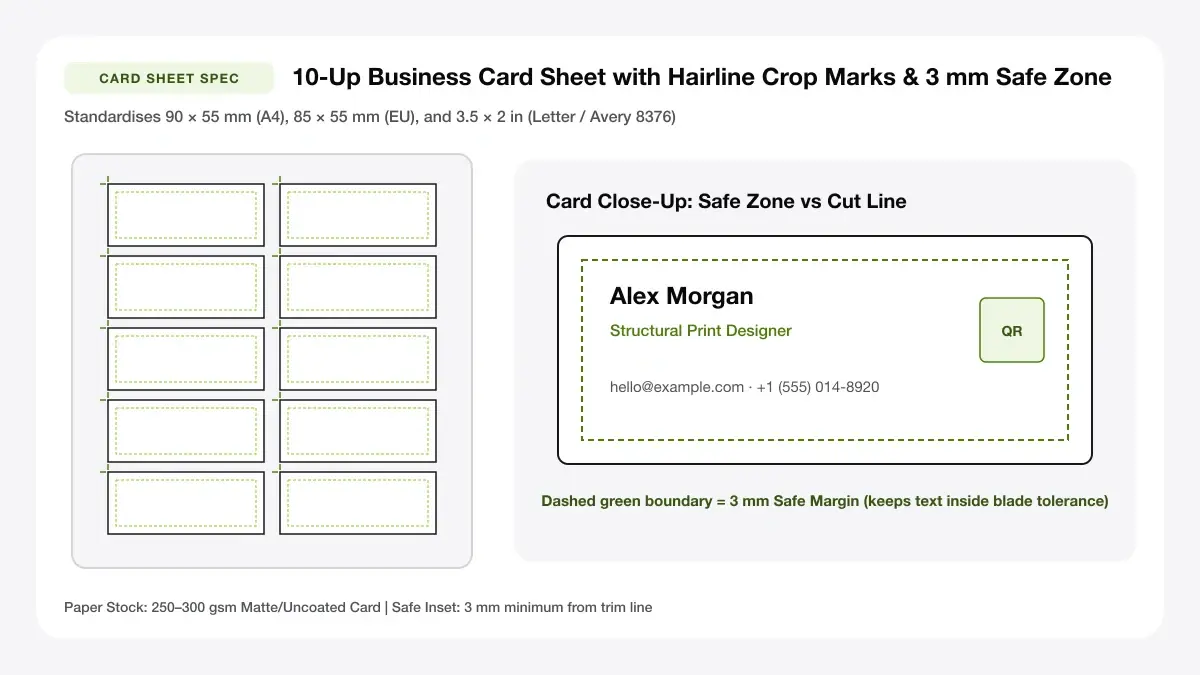
Perforated Avery 8371 / 8871 / C32011 Card Alignment
Align perfectly with pre-perforated Avery 5371, 8371, 8871 (US Letter) and C32011 (A4) micro-perforated business card packs.
How to use the Avery-compatible business card layout tool in 4 steps
Align typography or custom designs precisely onto pre-perforated Avery 5371, 8371, 8871 (Letter) or C32011 (A4) sheets.
Step 1: Select your Avery sheet number
Build clean contact cards inside the workspace or upload 3.5 × 2 inch art tuned for clean micro-perforated edges.
Step 2: Add your card design
Choose US Letter Avery 10-up (19 mm top / 19 mm side offsets) or A4 C32011 perforated packs to lock exact grid pitch.
Find your Avery product number
Avery mode eliminates trim gutters between touching rows and columns (0 mm gap) matching flush micro-perf seams.
Align the layout to the sheet
Turn Crop Marks OFF when printing onto perforated Avery cards so no stray black ticks stain clean torn card corners.
Step 3: Check the grid against the sheet
Verify design margins sit well inside flush edges—light backgrounds protect cleanly against micro-perforated tear drift.
Step 4: Download the PDF and print
Export 100% exact PDF coordinates and test on ordinary copy paper held behind an Avery pack before feeding stock.
Avery business card template: layouts and presets
Perforated-safe layouts keep designs neatly centered away from fine serrated seams for crisp tool-free card snapping.
Avery 8376-style layout
Uses a 2 × 5 grid of 3.5 × 2 inch (88.9 × 50.8 mm) cards centered on US Letter—compatible with standard 10-up micro-perforated sheets such as avery business cards 8376.
Common US business card sheet
Best for US Letter users
10-up A4 layout
Spaces ten 90 × 55 mm cards evenly across A4 for metric perforated card packs.
2 x 5 grid for A4 sheets
Best for A4 perforated sheets
Two-sided card layout
Enable Include Back Side to emit Page 2 centered identically to Page 1 so front and back line up cleanly on duplex sheets.
Front and back alignment helper
Best for double-sided sheets
— FREE INTERACTIVE SHEET GENERATOR —
Build & Download Your Avery Business Card Template PDF
Configure paper size, margins, gutters, and crop marks in real time using the avery business card template workspace above—no account or watermark.
Avery business card template for Word: paper size and print settings
Flush 10-up perforated stock leaves zero paper-cut forgiveness if print scaling or tray paper guides wobble even slightly.
Page size and orientation
Using Letter or A4
Snug rear paper-guide sliders flush against Avery Letter or A4 perforated card packs so sheets enter dead straight.
Scale, margins and bleed
Print at 100% or Actual Size
Confirm Actual Size (100% scale) carefully—Fit-to-Page shrinkage ruins all 5 row breaks down a perforated sheet.
Keep a safe margin
Maintain a generous 4–5 mm white safety zone around edges and strictly avoid dark bleed backgrounds on perforated stock.
Printable business cards Avery: recommended settings
Always turn off Crop marks when printing onto pre-perforated sheets, test-print one sheet on plain paper first, and hold it behind your perforated sheet against a light to confirm alignment.
Print quality and file format
PDF versus JPG output
Exact millimeter vector PDF matches physical perforated tear rows way more consistently than Word template margin sliders.
Print Avery business cards for everyday projects
Pre-perforated Avery packs shine when you want tool-free, uniform corners in hotel rooms or before early conferences.
Perforated card sheets at home
Matching perforated card sheets at home to exact Avery dimensions skips messy scissor work while producing crisp, uniform edges.
Small office and school printing
Matching small office and school printing to exact Avery dimensions skips messy scissor work while producing crisp, uniform edges.
Events and trade-show cards
Matching events and trade-show cards to exact Avery dimensions skips messy scissor work while producing crisp, uniform edges.
Tips for cleaner, sharper prints
Pre-print window-check and folding-seam separation advice for smooth Avery card edges.
Print one page on plain paper to test alignment
Putting "print one page on plain paper to test alignment" first guarantees all ten perforated cards pop cleanly without ragged corner nibs.
Disable 'fit to page' in the print dialog
Putting "disable 'fit to page' in the print dialog" first guarantees all ten perforated cards pop cleanly without ragged corner nibs.
Feed sheets the same way every time
Putting "feed sheets the same way every time" first guarantees all ten perforated cards pop cleanly without ragged corner nibs.
Frequently asked questions
Is there an Avery business card template for Word?
Yes, Word includes built-in label wizards, or you can skip Word alignment issues entirely by generating a locked-scale PDF right here in your browser.
How do I print Avery business cards?
Choose the 10-per-Letter 8376-style preset (or A4 10-up), fill in your card or upload your design, uncheck Crop marks, print a plain-paper test, and then print on your perforated sheet at 100% scale.
Where do I find the Avery 8376 business card template?
Select '10 per Letter · 8376-style (3.5 × 2 in)' in the Sheet Layout Preset dropdown above—it matches the standard 2 × 5 US Letter grid.
Can I print Avery cards at home?
Yes. Most inkjet and laser printers handle micro-perforated card sheets cleanly via the rear or bypass tray when set to Heavy Cardstock.
— EXPLORE MORE —
More print sheet tools and guides
print multiple business cards on one page
Impose uploaded card images onto A4 or Letter with cut marks.
business card template
Browse editable blank and styled business card templates.
avery template 28878
Decode common five-digit Avery template numbers and tab layouts.
— PRINT-READY IN UNDER A MINUTE —
Ready to Print Your Avery Business Card Template?
Jump back to the live canvas workspace above to customize your layout and download a locked-scale PDF, or explore companion tools.