Avery US Letter vs Avery Europe/UK A4 Code Numbering Guide
Decode Avery packaging numbers quickly so US Letter templates never drift onto A4 sheets or vice versa.
What an Avery template number tells you
Retail office-supply boxes print short 4- or 5-digit reference numbers primarily to map physical die-cut sheet layouts across word processors and print drivers.
Independent Compatibility Reference (Non-Affiliation Note)
Print Sheet Maker is an independent web tool and has zero affiliation with, sponsorship from, or endorsement by Avery Products Corporation. All product numbers (including 28878, 8877, 75500, and 5877) are discussed strictly as factual stationery compatibility references.
Layout, label size and sheet size
Every product code pins down four fixed traits: paper sheet standard, rows × columns per sheet, per-item finish (micro-perforated matte cardstock, glossy sticker, or tab film), and exact outer margins.
Reading a five-digit number
Packaging varies by pack count (e.g., 10 sheets vs 25 sheets vs 100 sheets), so two totally different retail SKUs often share the exact same geometric template layout underneath.
Letter versus A4 versions
Always check whether a code belongs to North American US Letter packs (8.5 × 11 in, e.g., 28878 or 8877) versus European/Australian ISO A4 packs (usually prefixed L or J, such as L7160 or C32011). Printing a Letter layout onto A4 paper cuts off the bottom cards or misaligns perforations.
Avery template 8877 and 28878 compared
Shoppers comparing avery template 28878 and avery template 8877 quickly discover both refer to classic US Letter 3.5 × 2 inch (89 × 51 mm) clean-edge micro-perforated business card cardstock—differing primarily by pack count, paper finish, or dual-sided coating.
| Code Reference | Sheet Size | Common Item Format | Grid / Count per Sheet |
|---|---|---|---|
| avery template 28878 | US Letter (8.5 × 11 in) | Two-sided Clean Edge matte business cards (3.5 × 2 in) | 10 cards / sheet (2 × 5) |
| avery template 8877 | US Letter (8.5 × 11 in) | Clean Edge matte white business cards (3.5 × 2 in) | 10 cards / sheet (2 × 5) |
| avery template 75500 | Check pack spec (divider/badge ref) | Regional specialty sheet / tab card stock | Match physical ruler count |
| free template avery 5877 | US Letter (8.5 × 11 in) | Laser Clean Edge white business cards (3.5 × 2 in) | 10 cards / sheet (2 × 5) |
Where each template is used
While 28878, 8877, and 5877 target heavy 10-up printable cardstock, tab-divider codes handle ring-binder index stickers instead.
Business cards versus labels
Micro-perforated card sheets snap apart cleanly without white scissor fuzz along edges, whereas adhesive label packs leave die-cut glue strips around every rectangle on a silicone liner.
Matching a non-Avery sheet to these layouts
Generic US Letter 10-up card packs sold at warehouse clubs use nearly identical 2 × 5 (3.5 × 2 in) margins (0.75 in left/right, 0.5 in top/bottom)—simply measure one blank page with a ruler and dial numbers cleanly into our custom grid.
— FASTER BROWSER ALTERNATIVE —
Skip Manual Setup — Use Our Free A4 Labels Template
Instead of wrestling with printer driver scaling or manual table margins, generate a locked 100%-scale PDF directly in your browser using our a4 labels template tool.
Avery template 75500 and free template Avery 5877
Whether unpacking older office cupboard stock labelled with avery template 75500 or bulk laser boxes marked for free template avery 5877, you never need legacy CD-ROM installers to print straight lines.
Business card and label numbers
5877 shares the exact 10-per-Letter 3.5 × 2 inch footprint designed specifically for laser heat durability, while 75500 and specialty office pack numbers verify exact sheet pitch straight from the packaging corner.
Finding your template online
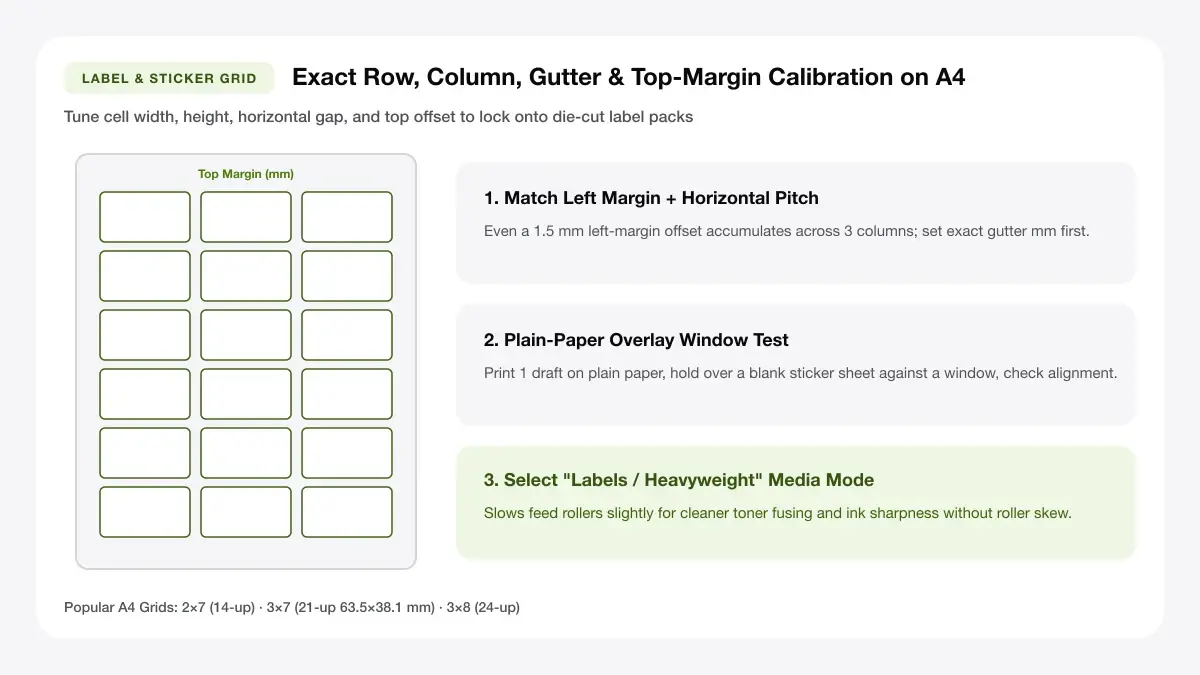
If a discontinued pack code no longer loads neatly inside online wizards, measure: (1) top margin, (2) left margin, (3) single card/label width and height, and (4) horizontal/vertical gaps between rows—five measurements replace any template code forever.
Avery easy apply label sheet 5 tab and 8 tab
Organising legal briefs or audit binders often relies on index sheets such as avery easy apply label sheet 5 tab and avery easy apply label sheet 8 tab strips.
Dividers and tab labels
Index tab strips apply all 5 or all 8 labels in one crisp peel-strip alignment step along mylar divider tabs rather than sticking tabs one by one.
5-tab and 8-tab differences
Standard 5-tab divider sets use wider ~2 inch wide tabs spaced vertically down an 11-inch edge; 8-tab sets shrink tab width closer to ~1.25 inches so more section titles fit vertically.
Printing tab sheets
Always test-print tab strip labels onto plain paper first and hold the sheet behind your physical translucent tab strip against a bright monitor or window before printing.
Use our layout tool without Avery software
Generate compatible print-ready PDFs directly in your browser for standard 10-up cards, 14-up addresses, or custom ruler-measured blank grids—no login, tracking, or plugin installs.
Print-ready PDFs for popular layouts
Export locked 100%-scale PDFs tuned for US Letter 10-up cardstock (compatible with 28878/8877/5877 geometry) or metric A4 packs.
Alignment tips
Always disable Fit to Page in Chrome or Acrobat, feed pre-scored packs via the flat rear tray, and verify page 1 registration on plain copy paper first.
Frequently asked questions
Direct answers on template codes, cross-brand compatibility, and independent tool usage.
Where do I find the Avery template number?
Look on the front carton label or top printable edge of any sheet—typically printed as a four- or five-digit number (such as avery template 28878, avery template 8877, or avery template 75500).
Can I use these templates with non-Avery sheets?
Yes, whenever physical card or label dimensions and margins match—or adjust custom rows, columns, and gaps directly inside our A4 Label Template builder to match any unbranded pack.
Is this tool affiliated with Avery?
No. Print Sheet Maker is completely independent and not affiliated with or endorsed by Avery; template numbers are referenced solely to help users match standard compatible sheet dimensions.
— PUT THIS WORKFLOW INTO ACTION —
Build Your Sheet with A4 Labels Template
Generate a print-ready PDF with exact margins, custom gutters, and hairline crop marks right now—completely free and with no sign-up.