Standard A4 1-Up, 8-Up, 21-Up & 24-Up Label Geometry
Choose ready-calibrated A4 8-up, 14-up, 21-up, or 24-up label templates compatible with popular Avery L7160 and J8160 sheets.
How to use the A4 label template generator in 4 steps
Configure any blank A4 label layout cleanly by matching the physical measurements on your sheet packaging.
Step 1: Enter rows and columns
Count how many labels sit across each row and down each column on your A4 sheet, then dial those counts into the grid controls.
Step 2: Set label width and height
Type the exact width and height of one individual label in millimetres so the PDF coordinates mirror your pre-cut sheet.
Measure your label sheet
Use a steel metric ruler to measure from the top edge of the paper to the first label cut line, and from the left edge to column one.
Top and side margin settings
Even a 2 mm discrepancy in top margin compounds across 8 or 10 rows down the page, so setting exact outer margins keeps the bottom row centered.
Step 3: Set margins and gaps
Adjust top margin, side margin, and vertical or horizontal gutters to handle kiss-cut gap strips between labels.
Step 4: Download the blank template
Export a filled or clean guide-outline template PDF and test alignment on copy paper before running adhesive packs.
A4 labels template: layouts and presets
Every A4 labels template preset below maps to widely sold metric label grids and custom cutter sheets.
2 x 5 labels (10-up)
Two columns by five rows (typically 99.1 × 57 mm or 105 × 57 mm) leaves plenty of space for courier addresses, logos, and handling instructions.
Large address-style labels
Standard A4 template coordinates lock tightly to Avery L7160 (21-up), L7163 (14-up), and 8-up / 24-up Euro die-cut sheets.
Best for shipping and mail
Keep clean borders toggled off on pre-perforated Avery packs so slight 1 mm tray skew never shows an unwanted box line.
3 x 8 labels (24-up)
Three columns by eight rows (around 63.5 × 33.9 mm or 70 × 37 mm) is the most popular general-purpose grid for jars, barcodes, and batch codes.
Standard small labels
Standard A4 template coordinates lock tightly to Avery L7160 (21-up), L7163 (14-up), and 8-up / 24-up Euro die-cut sheets.
Best for jars and products
Keep clean borders toggled off on pre-perforated Avery packs so slight 1 mm tray skew never shows an unwanted box line.
Custom grid
Dial in bespoke grids such as A4 4x6 labels style quartets, 2×2 quarter-sheets, or narrow 4×12 spice strip sheets.
Any size, margin and gap
Standard A4 template coordinates lock tightly to Avery L7160 (21-up), L7163 (14-up), and 8-up / 24-up Euro die-cut sheets.
Best for unusual sheets
Keep clean borders toggled off on pre-perforated Avery packs so slight 1 mm tray skew never shows an unwanted box line.
— FREE INTERACTIVE SHEET GENERATOR —
Build & Download Your A4 Labels Template PDF
Configure paper size, margins, gutters, and crop marks in real time using the a4 labels template workspace above—no account or watermark.
A4 label sheet template: paper size and print settings
Locking print driver scale ensures your A4 label sheet template produces crisp alignment down to the final row.
Page size and orientation
ISO A4 (210 × 297 mm) trays require A4-specific pitches; never print US Letter Avery templates onto European A4 label sheets.
Using A4 (210 x 297 mm)
Confirm your print dialog paper size is set to A4 (210 × 297 mm) and not US Letter. Printing an A4 PDF onto A4 stock with Letter selected in the driver shifts every row upward or clips the bottom row.
Scale, margins and bleed
Multi-row A4 matrices accumulate noticeable downward drift by row 7 or 8 whenever drivers scale pages down to 96%.
Print at 100% or Actual Size
Lock scale at 100% / Actual Size inside Chrome, Safari Preview, or Acrobat Reader so L7160 and J8160 rows hit every perforation.
Keep a safe margin
Inset titles and recipient names at least 3 mm from every die-cut edge to avoid touching peeled label seams.
A4 label template maker: recommended settings
Select 100% / Actual Size, set paper thickness to Labels or Cardstock so ink dries cleanly, and keep dashed crop borders enabled only when printing onto full uncut sticker sheets. This A4 label template maker exports true vector coordinates.
Print quality and file format
Crisp A4 vector PDFs eliminate raster fuzz around delicate 8–10 pt body copy on densely packed 24-up or 65-up sheets.
PDF versus JPG output
Native PDF rectangles and font outlines maintain exact 0.1 mm placement tolerance across every row of an A4 template pack.
A4 size label template for everyday projects
An accurate A4 size label template rescues blank sheet packs whose original software template links have expired or no longer open.
Matching an unfamiliar label sheet
Bought bulk unbranded label packs with no template code? Measure width, height, and margins once and generate a reusable PDF grid in under two minutes.
Printing on blank sticker paper
Use full uncut A4 adhesive sheets with faint crop lines enabled so you can slice any custom rectangular label size cleanly with a sliding trimmer.
Aligning labels for guillotine cutting
Set zero gaps between labels when printing onto full-sheet cardstock or vinyl so a single straight guillotine pass trims two neighbouring columns at once.
Tips for cleaner, sharper prints
Compare standard European and Australian sheet dimensions in our full reference on
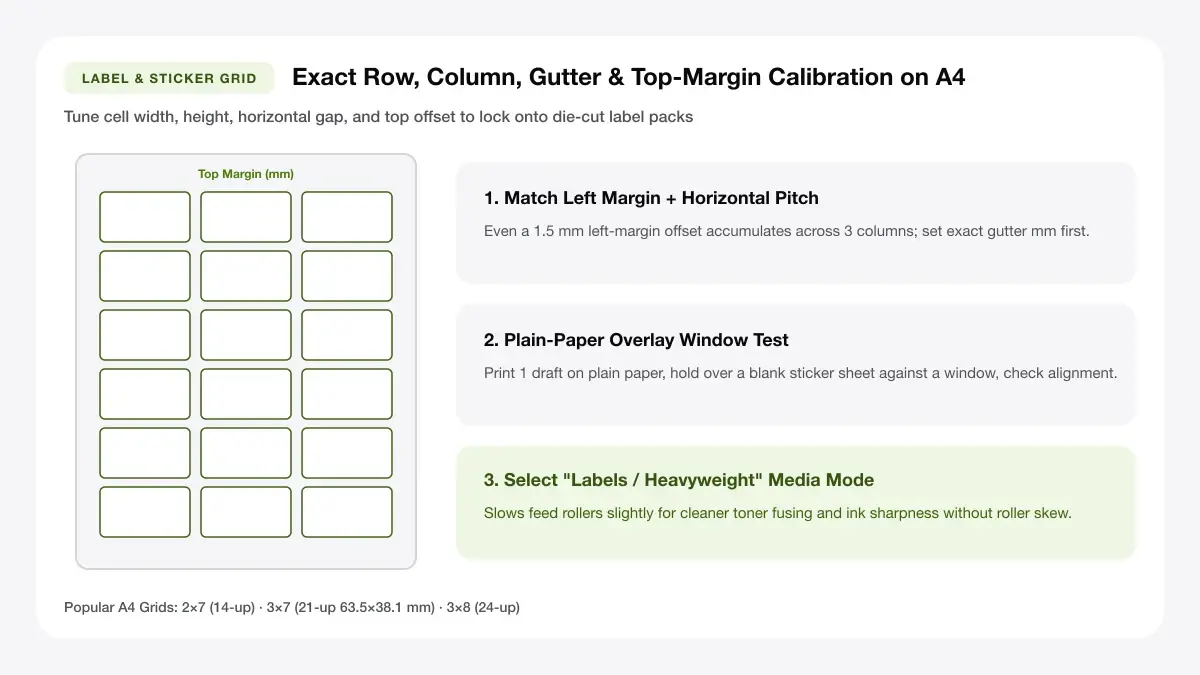
HOLD-LIGHT CHECK: Print one plain-paper draft and hold it over an A4 adhesive sheet against a window before committing the batch.
Measure the sheet with a ruler before you enter sizes
Never guess 'about 7 cm'—one millimetre error across 3 columns or 8 rows adds up to 3–8 mm of drift by the far corner of the sheet.
Print the grid on plain paper and hold it up to the sheet
Place your plain-paper test print directly behind a blank label sheet against daylight so you can see immediately whether the grid lines kiss every pre-cut border.
Allow 1 to 2 mm tolerance for printer drift
Desktop paper rollers vary by ±1 mm from sheet to sheet. Keep text and borders 2–3 mm inside the cell box rather than flush against the cut line.
Frequently asked questions
Answers covering ISO A4 label code compatibility, top-start offsets, and pre-die-cut registration troubleshooting.
How do I make an A4 labels template?
Choose an A4 labels template preset in the generator above, verify rows, columns, and cell dimensions against your sheet, add text or keep cells blank for handwriting, and export at 100% scale PDF.
What is the size of an A4 label sheet?
An A4 label sheet always measures 210 × 297 mm (8.27 × 11.69 inches). Individual label sizes vary from 2 per sheet (half-A4) up to 65+ mini labels per sheet.
Can I use this with any brand of labels?
Yes. Because you can adjust rows, columns, width, height, and margins freely, sheets compatible with Avery, Herma, Officeworks, or unbranded generic packs all align cleanly (this tool is independent and not affiliated with any label brand).
How do I fix labels that print out of alignment?
First verify the PDF viewer is set to Actual Size (100%), not Fit to Page. Next confirm the printer driver paper size is A4 rather than Letter, and test feed orientation on plain paper.
— EXPLORE MORE —
More print sheet tools and guides
Explore address mailers, circular jar seals, barcode sheets, or browse the full label sticker hub.
Printable label maker
Build full product, pantry, and office label sheets with rich text and icons.
A4 address labels
Format 14-up mailing and 8-up parcel shipping sheets ready for postal runs.
Free name tag maker
Format 8-up conference badges and adhesive mixer tags on ISO A4 sheets.
Avery template 28878 decoded
Cross-check US Letter Avery numbers with ISO A4 sheet codes before printing.
Where to buy A4 label sheets
Compare Officeworks, Avery, and Amazon bulk A4 label sheet packs by price.
Label paper for printer
Browse common A4 grid sizes, paper stocks, and compatibility charts.
— PRINT-READY IN UNDER A MINUTE —
Ready to Print Your A4 Labels Template?
Jump back to the live canvas workspace above to customize your layout and download a locked-scale PDF, or explore companion tools.