14-Up & 21-Up A4 Address & Parcel Label Grid
Print crisp return-address mailers (21-up) or shipping parcel labels (8-up / 14-up) cleanly onto A4 Avery or blank adhesive paper.
How to use the address and shipping label sheet maker in 4 steps
Prepare clean postal sheets in minutes with this online address and shipping label sheet maker.
Step 1: Choose an address or shipping label size
Pick a classic 2×7 (14-up) mailing grid, a larger 2×4 (8-up) parcel grid, or a 2-up half-sheet layout on A4.
Step 2: Type or paste your addresses
Fill every cell with one return address for bulk stationery, or toggle multi-entry mode to paste unique recipient names and postal codes per slot.
Single address or many addresses
Use repeat mode for branded return-address stickers, or batch-entry mode when fulfilling an afternoon of marketplace parcel orders.
Sender and return-address layout
Reserve the top two lines for an understated sender address or small brand line above a bold recipient block for rapid courier sorting.
Step 3: Preview all labels on the sheet
Inspect line wrapping across the full sheet preview so long street names and international postcodes never truncate.
Step 4: Download the PDF and print
Export your vector PDF, print at 100% scale on copy paper first to verify tray registration, then feed adhesive label sheets.
A4 address labels: layouts and presets
Select the A4 address labels grid size that matches the envelopes, satchels, or cardboard mailers in your dispatch workflow.
2 x 7 address labels (14-up)
Fourteen 99.1 × 38.1 mm labels per A4 sheet offer generous legibility for DL, C5, and wedding invitation envelopes without wasted margins.
Standard mailing label grid
A4 address and parcel grids pair 21-up return-address cells (63.5 × 38.1 mm) with generous 8-up and 14-up shipping blocks.
Best for envelopes and parcels
Left-align multi-line postal codes in a bold sans font for instant postal sorter optical readability through rain or glare.
2 x 4 shipping labels (8-up)
Eight 99.1 × 67.7 mm labels per sheet give ample height for To/From addresses, order IDs, fragile notices, and tracking references.
Larger labels with room for barcodes
A4 address and parcel grids pair 21-up return-address cells (63.5 × 38.1 mm) with generous 8-up and 14-up shipping blocks.
Best for e-commerce parcels
Left-align multi-line postal codes in a bold sans font for instant postal sorter optical readability through rain or glare.
Half-sheet shipping labels
Two large 199.6 × 143.5 mm zones fit oversized carton labels, pallet slips, and courier manifests cleanly on standard A4 stock.
Two labels per A4 sheet
A4 address and parcel grids pair 21-up return-address cells (63.5 × 38.1 mm) with generous 8-up and 14-up shipping blocks.
Best for large parcels
Left-align multi-line postal codes in a bold sans font for instant postal sorter optical readability through rain or glare.
— FREE INTERACTIVE SHEET GENERATOR —
Build & Download Your A4 Address Labels PDF
Configure paper size, margins, gutters, and crop marks in real time using the a4 address labels workspace above—no account or watermark.
A4 shipping labels: paper size and print settings
Prevent clipped postcodes on A4 shipping labels by keeping print scaling locked and toner contrast dark.
Page size and orientation
Confirm UK/EU/AU A4 tray selection so tall 8-up parcel labels keep proper bottom clearance in manual feed slots.
Using A4
Keep your document size and print driver locked to ISO A4 (210 × 297 mm) when printing on shipping label paper A4 packs so the bottom row never drops off the sheet.
Scale, margins and bleed
Address sheets suffer clipped ZIP/postcodes on row 7 if the PDF viewer shrinks an A4 sheet inside unprintable printer margins.
Print at 100% or Actual Size
Pick Actual Size (100% scale) and disable Borderless Expansion so return-mail sheets hit every sticky rectangle cleanly.
Keep a safe margin
Leave 3 mm clear around postal numbers and return logos so standard courier scanner windows capture the whole block.
A4 address label template: recommended settings
Enable 100% Actual Size, choose Standard or High quality black text, and use matte shipping label paper A4 packs so ink dries immediately without smudging during packing. This A4 address label template setup keeps edges razor-sharp.
Print quality and file format
Razor-sharp black vector address type prevents ink spread on matte permanent mailers and laser-safe shipping labels.
PDF versus JPG output
High-density vector PDFs keep 9 pt apartment numbers and country names distinct even on draft-mode office laser printers.
Shipping labels A4 for everyday projects
Clean shipping labels A4 save hours compared to handwriting packages or taping trimmed copy paper onto satchels.
Online sellers and Etsy shops
Print tidy return-address badges and tracking parcel slips in one quick pass right from your packing desk.
Wedding and event invitations
Generate uniform guest envelope labels and RSVP return-address sets on matte white or kraft stock with matching typography.
Small businesses and clubs
Mail invoices, membership welcome kits, and seasonal newsletters with crisp, scannable address blocks.
Tips for cleaner, sharper prints
Want exact metric cell specs for 14-up, 16-up, and 8-up packs? Browse our dimensions chart for
Use smear-resistant matte inkjet or permanent laser stock if envelopes face rain, parcel chutes, or rough sorting belts.
Use 11 pt or larger for postal readability
Automated postal optical readers and delivery drivers in low light read 11–13 pt clean sans-serif type far more reliably than decorative scripts.
Test alignment on plain paper first
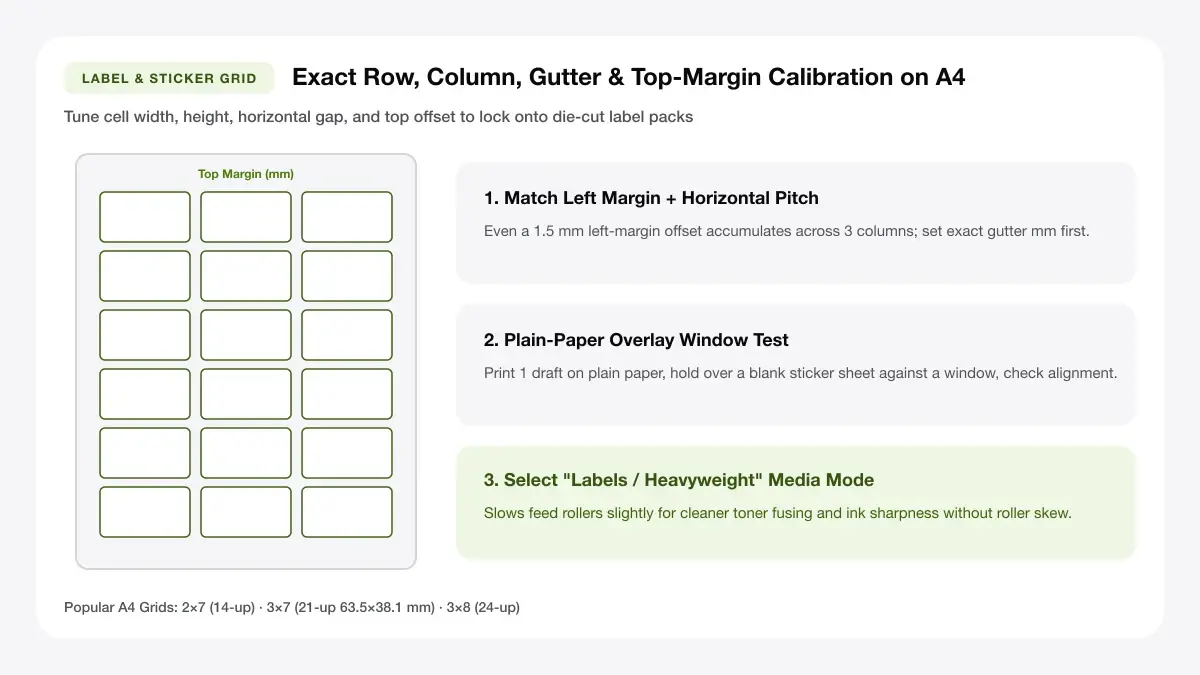
A five-second plain-paper check against a blank label sheet prevents spoiling an entire pack of adhesive parcel sheets.
Use high-contrast ink on white sheets
Stick to solid black ink on bright matte white label stock so addresses stay readable inside clear poly courier pouches.
Frequently asked questions
Solutions for CSV/list pasting mistakes, A4 14-up/21-up parcel sizing, and smudged ink on address mailers.
How do I print A4 address labels?
Open this address label sheet maker, pick the 2×7 (14-up) or 2×4 (8-up) layout, type or paste your addresses, export the PDF, and print at 100% Actual Size onto A4 label sheets.
What is the best A4 shipping label size?
For everyday satchels and medium boxes, 2×4 (8-up, ~99.1 × 67.7 mm) gives clear space for To/From blocks; for bulky cartons or marketplace waybills, 2-up half-sheet labels work best.
Can I print different addresses on one sheet?
Yes. Switch from Repeat mode to Individual Cells inside the tool editor above to type or paste a distinct recipient into every label position on the A4 sheet.
Do I need special paper for shipping labels?
Self-adhesive A4 address or shipping label sheets save packing tape and stay flat in rain, though matte uncoated inkjet or laser sheets handle handwriting and stamps best.
— EXPLORE MORE —
More print sheet tools and guides
Generate accompanying SKU barcode strips, A4 custom matrices, or full sticker sheets in one browser session.
How do i print different address labels on one sheet
Follow our step-by-step workflow for printing mixed recipient lists without spreadsheet headaches.
A4 labels template
Build custom row and column dimensions for non-standard blank A4 label packs.
Barcode sticker A4 sheet
Generate scannable EAN-13, UPC, and Code 128 SKU barcode stickers across A4 pages.
— PRINT-READY IN UNDER A MINUTE —
Ready to Print Your A4 Address Labels?
Jump back to the live canvas workspace above to customize your layout and download a locked-scale PDF, or explore companion tools.